ESP32-S3-DevKitC N16R8 CAM: Bài 04 – Setup Arduino IDE v2 “đúng chuẩn” (PSRAM / Partition / USB-CDC)
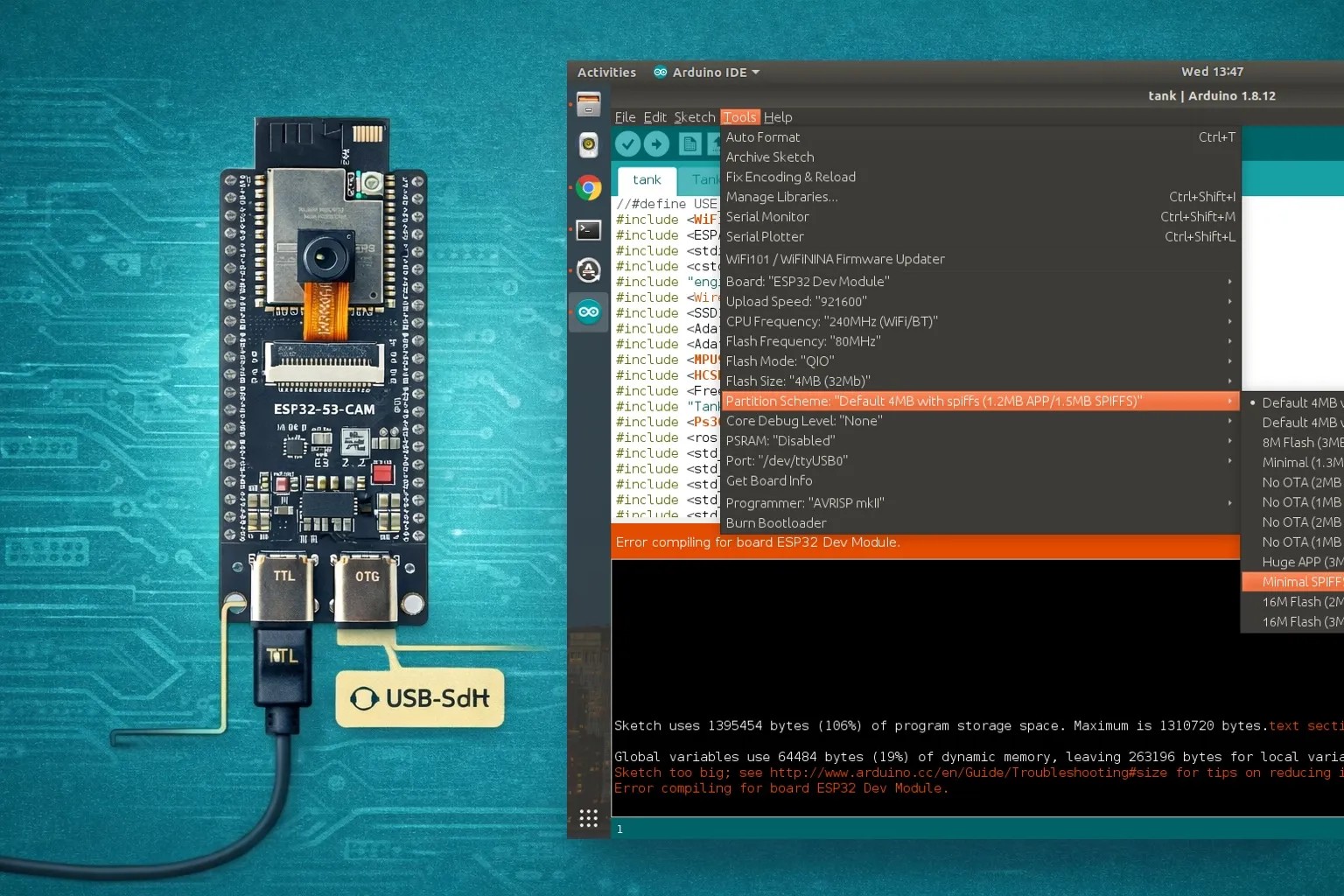
Giới thiệu
Sau khi đã nhận diện đúng board (Bài 01), kiểm tra phần cứng (Bài 02) và phân biệt COM vs USB Native (Bài 03), bước quan trọng tiếp theo là cấu hình Arduino IDE v2 sao cho nạp chắc chắn, ổn định và không phát sinh lỗi vặt.
ESP32-S3-DevKitC N16R8 CAM có Flash 16MB + PSRAM 8MB, lại thêm USB Native, nên nếu cấu hình IDE sai, bạn sẽ gặp các lỗi rất phổ biến như:
- Không nhận PSRAM
- Camera chạy crash
- USB CDC không hiện Serial
- Nạp lúc được lúc không
Bài 04 sẽ giúp bạn setup Arduino IDE v2 đúng ngay từ đầu, theo hướng an toàn cho người mới và đủ sâu cho dự án thực tế.
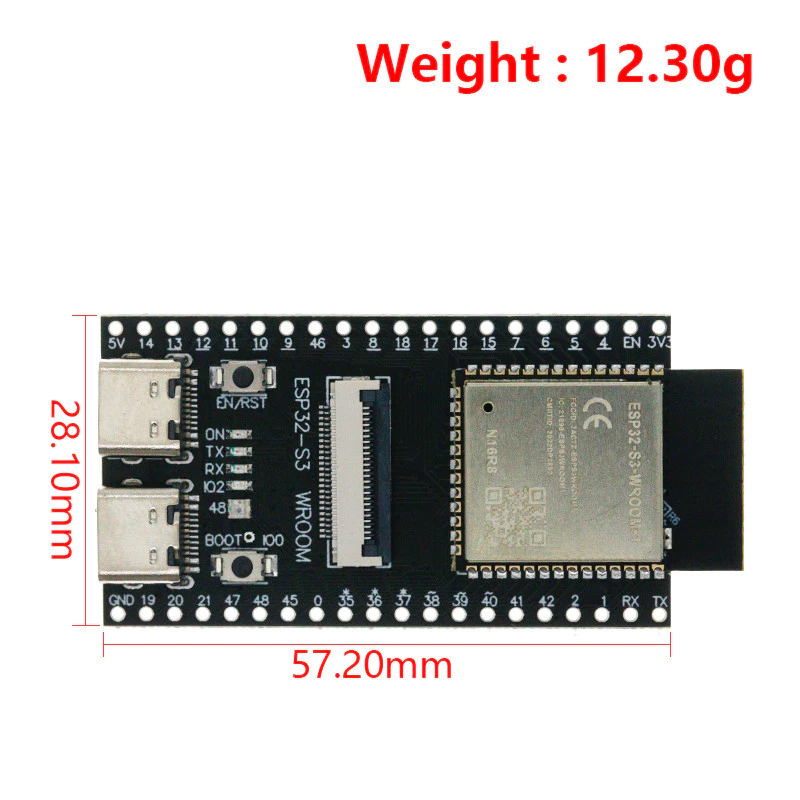
Hình ảnh board thực tế
1. Cài đặt Arduino IDE v2 & ESP32 core
Phiên bản khuyến nghị
- Arduino IDE: v2.x (mới nhất)
- ESP32 Board Manager: Espressif Systems ≥ 2.0.11
Cài ESP32 core
- Mở Boards Manager
- Tìm esp32 by Espressif Systems
- Cài đặt
⚠️ Không dùng core quá cũ → dễ lỗi USB & PSRAM
2. Chọn đúng board cho ESP32-S3-DevKitC N16R8 CAM
Board name: ESP32S3 Dev Module
Đây là lựa chọn an toàn nhất cho các board ESP32-S3 CAM dạng DevKitC
3. Thiết lập PSRAM (BẮT BUỘC cho bản CAM)
Vì sao PSRAM quan trọng?
- Camera buffer cần rất nhiều RAM
- Không bật PSRAM → camera crash hoặc không chạy
Cấu hình
- PSRAM: Enabled
- PSRAM Type: OPI PSRAM (nếu có)
Dấu hiệu đúng
- Serial log có dòng:
PSRAM found
4. Partition Scheme phù hợp cho N16R8
Khuyến nghị
- Partition Scheme: Huge APP (3MB No OTA/1MB SPIFFS) hoặc
- Huge APP (No OTA)
Vì sao?
- Firmware camera + SD + WiFi rất lớn
- Tránh lỗi Sketch too big
5. USB CDC On Boot – bật hay tắt?
Dùng cổng COM (USB-UART)
- USB CDC On Boot: Disabled
Dùng USB Native (OTG)
- USB CDC On Boot: Enabled
⚠️ Nếu bật sai → máy không hiện Serial hoặc không nhận USB
6. Upload Mode & tốc độ nạp
Upload Mode
- Dùng COM: UART0 / USB-UART
- Dùng USB Native: USB
Upload Speed
- 115200 (khuyến nghị)
- Giảm xuống 460800 nếu lỗi
7. Cấu hình IDE mẫu (an toàn nhất)
Khuyến nghị cho người mới:
- Board: ESP32S3 Dev Module
- PSRAM: Enabled
- Flash Size: 16MB (do board đang dùng 16MB)
- Partition Scheme: 16M Flash / Huge APP
- USB CDC On Boot: Disabled
- Upload Mode: UART0
- Upload Speed: 115200 (khi serial monitor cũng chọn cùng speed này để hiển thị đúng)
- Port: COM (USB-UART)
? Dùng cấu hình này để test LED, SD, camera trước
8. Code kiểm tra Board
Test 1 — Kiểm tra Serial + Flash + PSRAM
Nạp code này trước:
/**
 * Test 1 — Kiểm tra Serial + Flash + PSRAM
 * Board: ESP32-S3-DevKitC N16R8 CAM
*/
void setup() {
  Serial.begin(115200);
  delay(2000);

  Serial.println();
  Serial.println("ESP32-S3 N16R8 CAM Test");

  Serial.print("Chip Model: ");
  Serial.println(ESP.getChipModel());

  Serial.print("Chip Revision: ");
  Serial.println(ESP.getChipRevision());

  Serial.print("CPU Freq MHz: ");
  Serial.println(ESP.getCpuFreqMHz());

  Serial.print("Flash Size: ");
  Serial.print(ESP.getFlashChipSize() / (1024 * 1024));
  Serial.println(" MB");

  Serial.print("PSRAM Size: ");
  Serial.print(ESP.getPsramSize() / (1024 * 1024));
  Serial.println(" MB");

  Serial.print("Free Heap: ");
  Serial.println(ESP.getFreeHeap());

  Serial.print("Free PSRAM: ");
  Serial.println(ESP.getFreePsram());
}

void loop() {
  delay(1000);
}
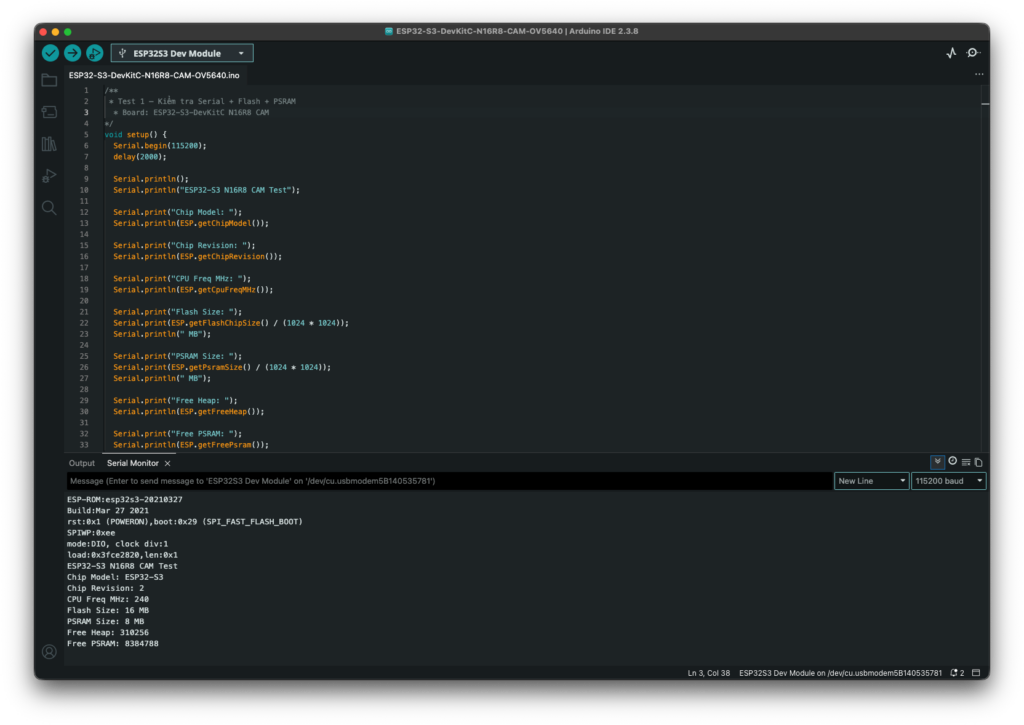
Mở Serial Monitor:
Baud: 115200Kết quả mong muốn:
Flash Size: 16 MB
PSRAM Size: 8 MB
Nếu PSRAM hiện 0 MB, kiểm tra lại:
Tools → PSRAM → OPI PSRAMCamera cần PSRAM hoạt động ổn định, đặc biệt khi stream/chụp ảnh độ phân giải cao.
Test 2 — Test LED onboard / WS2812
Nhiều board ESP32-S3 CAM dùng LED RGB WS2812 ở GPIO48.
Cài thư viện:
Tools → Manage Libraries → tìm Adafruit NeoPixel → InstallCode test:
#include <Adafruit_NeoPixel.h>

#define LED_PIN 48
#define LED_COUNT 1

Adafruit_NeoPixel pixel(LED_COUNT, LED_PIN, NEO_GRB + NEO_KHZ800);

void setup() {
  pixel.begin();
  pixel.setBrightness(30);
}

void loop() {
  pixel.setPixelColor(0, pixel.Color(255, 0, 0));
  pixel.show();
  delay(500);

  pixel.setPixelColor(0, pixel.Color(0, 255, 0));
  pixel.show();
  delay(500);

  pixel.setPixelColor(0, pixel.Color(0, 0, 255));
  pixel.show();
  delay(500);

  pixel.clear();
  pixel.show();
  delay(500);
}
Nếu LED không sáng, có thể board của bạn dùng GPIO khác hoặc không có WS2812.
Test 3 — Test WiFi Scan
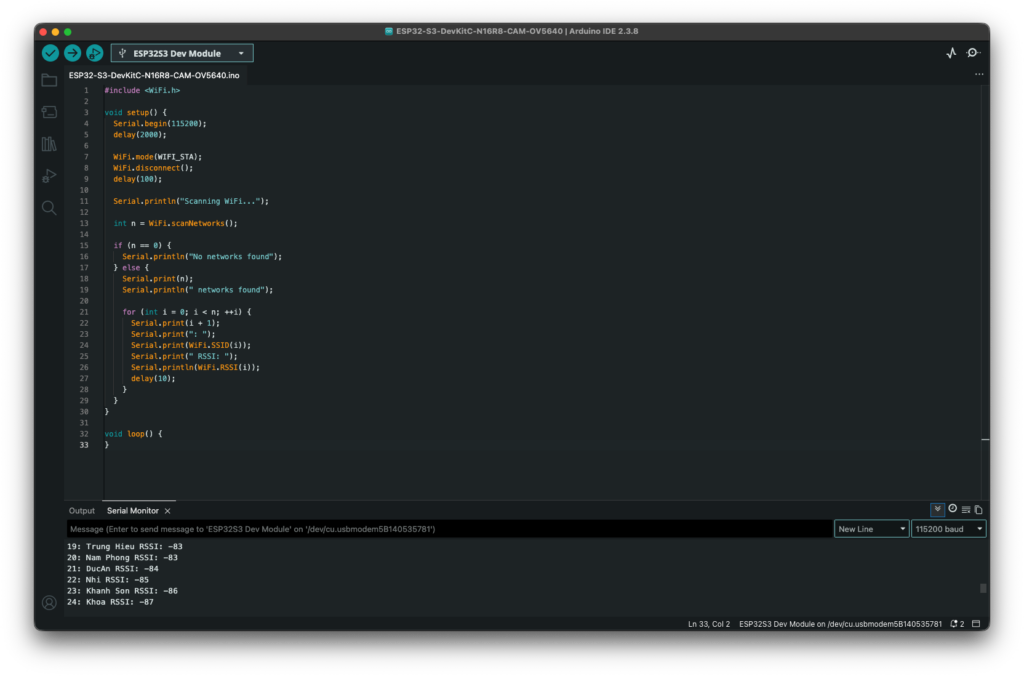
Code này kiểm tra WiFi có hoạt động không:
#include <WiFi.h>

void setup() {
  Serial.begin(115200);
  delay(2000);

  WiFi.mode(WIFI_STA);
  WiFi.disconnect();
  delay(100);

  Serial.println("Scanning WiFi...");

  int n = WiFi.scanNetworks();

  if (n == 0) {
    Serial.println("No networks found");
  } else {
    Serial.print(n);
    Serial.println(" networks found");

    for (int i = 0; i < n; ++i) {
      Serial.print(i + 1);
      Serial.print(": ");
      Serial.print(WiFi.SSID(i));
      Serial.print(" RSSI: ");
      Serial.println(WiFi.RSSI(i));
      delay(10);
    }
  }
}

void loop() {
}
Nếu chạy tới WiFi thì board reset liên tục, thường là do nguồn USB yếu. Với board CAM, không nên dùng hub USB rẻ tiền khi test WiFi/Camera.
Test 4 — Test Camera bằng ví dụ có sẵn
Trong Arduino IDE mở:
File → Examples → ESP32 → Camera → CameraWebServerSau đó chọn model gần đúng hoặc tự cấu hình pin.
Với ESP32-S3-DevKitC N16R8 CAM, phần quan trọng nhất là camera pin mapping phải đúng theo board. Các board ESP32 camera khác nhau có thể dùng GPIO khác nhau cho XCLK, SIOD, SIOC, D0-D7, VSYNC, HREF, PCLK.
Trong code CameraWebServer, sửa WiFi:
const char* ssid = "YOUR_WIFI_NAME";
const char* password = "YOUR_WIFI_PASSWORD";
Sau khi nạp, mở Serial Monitor, bạn sẽ thấy IP dạng:
Camera Ready! Use 'http://192.168.x.x' to connectMở IP đó trên trình duyệt.
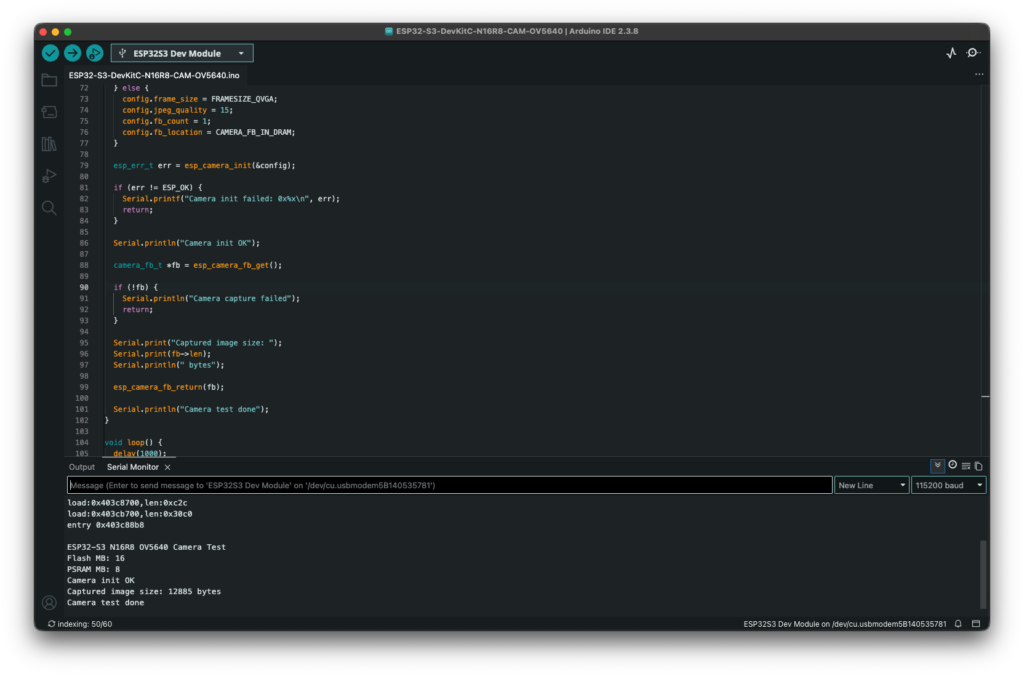
Test 4 — Ví dụ Test Camera
Test bằng code tối giản này:
#include "esp_camera.h"
#include <WiFi.h>

const char* ssid = "YOUR_WIFI";
const char* password = "YOUR_PASSWORD";

#define PWDN_GPIO_NUM     -1
#define RESET_GPIO_NUM    -1
#define XCLK_GPIO_NUM     15
#define SIOD_GPIO_NUM     4
#define SIOC_GPIO_NUM     5

#define Y2_GPIO_NUM       11
#define Y3_GPIO_NUM       9
#define Y4_GPIO_NUM       8
#define Y5_GPIO_NUM       10
#define Y6_GPIO_NUM       12
#define Y7_GPIO_NUM       18
#define Y8_GPIO_NUM       17
#define Y9_GPIO_NUM       16

#define VSYNC_GPIO_NUM    6
#define HREF_GPIO_NUM     7
#define PCLK_GPIO_NUM     13

void setup() {
  Serial.begin(115200);
  delay(3000);

  Serial.println();
  Serial.println("ESP32-S3 N16R8 OV5640 Camera Test");

  Serial.print("Flash MB: ");
  Serial.println(ESP.getFlashChipSize() / 1024 / 1024);

  Serial.print("PSRAM MB: ");
  Serial.println(ESP.getPsramSize() / 1024 / 1024);

  camera_config_t config;
  config.ledc_channel = LEDC_CHANNEL_0;
  config.ledc_timer = LEDC_TIMER_0;

  config.pin_d0 = Y2_GPIO_NUM;
  config.pin_d1 = Y3_GPIO_NUM;
  config.pin_d2 = Y4_GPIO_NUM;
  config.pin_d3 = Y5_GPIO_NUM;
  config.pin_d4 = Y6_GPIO_NUM;
  config.pin_d5 = Y7_GPIO_NUM;
  config.pin_d6 = Y8_GPIO_NUM;
  config.pin_d7 = Y9_GPIO_NUM;

  config.pin_xclk = XCLK_GPIO_NUM;
  config.pin_pclk = PCLK_GPIO_NUM;
  config.pin_vsync = VSYNC_GPIO_NUM;
  config.pin_href = HREF_GPIO_NUM;

  config.pin_sccb_sda = SIOD_GPIO_NUM;
  config.pin_sccb_scl = SIOC_GPIO_NUM;

  config.pin_pwdn = PWDN_GPIO_NUM;
  config.pin_reset = RESET_GPIO_NUM;

  config.xclk_freq_hz = 20000000;
  config.pixel_format = PIXFORMAT_JPEG;

  if (psramFound()) {
    config.frame_size = FRAMESIZE_VGA;
    config.jpeg_quality = 12;
    config.fb_count = 2;
    config.fb_location = CAMERA_FB_IN_PSRAM;
    config.grab_mode = CAMERA_GRAB_LATEST;
  } else {
    config.frame_size = FRAMESIZE_QVGA;
    config.jpeg_quality = 15;
    config.fb_count = 1;
    config.fb_location = CAMERA_FB_IN_DRAM;
  }

  esp_err_t err = esp_camera_init(&config);

  if (err != ESP_OK) {
    Serial.printf("Camera init failed: 0x%x\n", err);
    return;
  }

  Serial.println("Camera init OK");

  camera_fb_t *fb = esp_camera_fb_get();

  if (!fb) {
    Serial.println("Camera capture failed");
    return;
  }

  Serial.print("Captured image size: ");
  Serial.print(fb->len);
  Serial.println(" bytes");

  esp_camera_fb_return(fb);

  Serial.println("Camera test done");
}

void loop() {
  delay(1000);
}
Kết quả mong muốn
Serial Monitor 115200 sẽ hiện:
Flash MB: 16
PSRAM MB: 8
Camera init OK
Captured image size: xxxxx bytes
Camera test done
Nếu báo lỗi camera
Nếu thấy:
Camera init failed: 0x105thường là sai pin mapping hoặc camera chưa giao tiếp SCCB/I2C được.
Nếu thấy:
Camera capture failedthường là camera init được nhưng dữ liệu D0-D7/PCLK/VSYNC/HREF sai, nguồn yếu, hoặc OV5640 cần giảm frame size.
Với OV5640, khi test lần đầu nên để:
FRAMESIZE_QVGA hoặc FRAMESIZE_VGA
JPEG quality: 12–15
XCLK: 20MHz
Sau khi camera chạy ổn mới tăng độ phân giải.
Test 5: Camera Stream Webserver
#include "esp_camera.h"
#include <WiFi.h>
#include "esp_http_server.h"

// =====================================================
// ESP32-S3 N16R8 CAM + OV5640 Optimized Web Server
// Goal: cooler, more stable, less load, acceptable quality
// =====================================================

// ---------- WiFi ----------
const char* WIFI_SSID = "YOUR_WIFI";
const char* WIFI_PASSWORD = "YOUR_PASSWORD";

// ---------- Camera Pins: ESP32-S3 N16R8 CAM ----------
#define PWDN_GPIO_NUM     -1
#define RESET_GPIO_NUM    14

#define XCLK_GPIO_NUM     15
#define SIOD_GPIO_NUM     4
#define SIOC_GPIO_NUM     5

#define Y2_GPIO_NUM       11
#define Y3_GPIO_NUM       9
#define Y4_GPIO_NUM       8
#define Y5_GPIO_NUM       10
#define Y6_GPIO_NUM       12
#define Y7_GPIO_NUM       18
#define Y8_GPIO_NUM       17
#define Y9_GPIO_NUM       16

#define VSYNC_GPIO_NUM    6
#define HREF_GPIO_NUM     7
#define PCLK_GPIO_NUM     13

// ---------- Stream optimization ----------
#define STREAM_DELAY_MS   120     // Increase to 150-200 if board is hot
#define WIFI_TX_POWER     WIFI_POWER_8_5dBm

// JPEG quality: lower number = better image, more heat/load
// Good stable range: 15-20
#define JPEG_QUALITY      18

// Start with QVGA for cooler operation. Try VGA after stable.
#define CAMERA_FRAME_SIZE FRAMESIZE_QVGA

#define PART_BOUNDARY "123456789000000000000987654321"
static const char* STREAM_CONTENT_TYPE = "multipart/x-mixed-replace;boundary=" PART_BOUNDARY;
static const char* STREAM_BOUNDARY = "\r\n--" PART_BOUNDARY "\r\n";
static const char* STREAM_PART = "Content-Type: image/jpeg\r\nContent-Length: %u\r\n\r\n";

httpd_handle_t camera_httpd = NULL;

// ---------- Simple HTML page ----------
static const char INDEX_HTML[] PROGMEM = R"rawliteral(
<!DOCTYPE html>
<html>
<head>
  <meta name="viewport" content="width=device-width, initial-scale=1" />
  <title>ESP32-S3 OV5640 Camera</title>
  <style>
    body {
      font-family: Arial, sans-serif;
      background: #101010;
      color: white;
      text-align: center;
      margin: 0;
      padding: 16px;
    }
    .card {
      max-width: 920px;
      margin: auto;
    }
    img {
      width: 100%;
      max-width: 900px;
      border-radius: 12px;
      background: #000;
      border: 1px solid #333;
    }
    a, button {
      display: inline-block;
      margin: 8px;
      padding: 10px 14px;
      border-radius: 8px;
      border: 0;
      background: #0e8578;
      color: white;
      text-decoration: none;
      font-size: 15px;
      cursor: pointer;
    }
    .hint {
      color: #bbb;
      font-size: 14px;
    }
  </style>
</head>
<body>
  <div class="card">
    <h2>ESP32-S3 N16R8 CAM - OV5640</h2>
    <p class="hint">Optimized low-heat stream mode</p>
    <a href="/capture" target="_blank">Capture</a>
    <a href="/stream" target="_blank">Open Stream Only</a>
    <br />
    <img src="/stream" />
  </div>
</body>
</html>
)rawliteral";

static esp_err_t index_handler(httpd_req_t *req) {
  httpd_resp_set_type(req, "text/html");
  httpd_resp_set_hdr(req, "Cache-Control", "no-store");
  return httpd_resp_send(req, INDEX_HTML, strlen(INDEX_HTML));
}

static esp_err_t capture_handler(httpd_req_t *req) {
  camera_fb_t *fb = esp_camera_fb_get();

  if (!fb) {
    Serial.println("Capture failed");
    httpd_resp_send_500(req);
    return ESP_FAIL;
  }

  httpd_resp_set_type(req, "image/jpeg");
  httpd_resp_set_hdr(req, "Content-Disposition", "inline; filename=capture.jpg");
  httpd_resp_set_hdr(req, "Cache-Control", "no-store");

  esp_err_t res = httpd_resp_send(req, (const char *)fb->buf, fb->len);
  esp_camera_fb_return(fb);
  return res;
}

static esp_err_t stream_handler(httpd_req_t *req) {
  camera_fb_t *fb = NULL;
  esp_err_t res = ESP_OK;
  char part_buf[80];

  res = httpd_resp_set_type(req, STREAM_CONTENT_TYPE);
  if (res != ESP_OK) return res;

  httpd_resp_set_hdr(req, "Access-Control-Allow-Origin", "*");
  httpd_resp_set_hdr(req, "Cache-Control", "no-store");

  while (true) {
    fb = esp_camera_fb_get();

    if (!fb) {
      Serial.println("Stream capture failed");
      res = ESP_FAIL;
      break;
    }

    if (fb->format != PIXFORMAT_JPEG) {
      Serial.println("Frame is not JPEG");
      esp_camera_fb_return(fb);
      res = ESP_FAIL;
      break;
    }

    res = httpd_resp_send_chunk(req, STREAM_BOUNDARY, strlen(STREAM_BOUNDARY));

    if (res == ESP_OK) {
      size_t hlen = snprintf(part_buf, sizeof(part_buf), STREAM_PART, fb->len);
      res = httpd_resp_send_chunk(req, part_buf, hlen);
    }

    if (res == ESP_OK) {
      res = httpd_resp_send_chunk(req, (const char *)fb->buf, fb->len);
    }

    esp_camera_fb_return(fb);
    fb = NULL;

    if (res != ESP_OK) {
      Serial.println("Client disconnected or stream error");
      break;
    }

    // Important: reduce CPU/WiFi load and heat
    delay(STREAM_DELAY_MS);
  }

  return res;
}

bool initCamera() {
  camera_config_t config;
  memset(&config, 0, sizeof(config));

  config.ledc_channel = LEDC_CHANNEL_0;
  config.ledc_timer = LEDC_TIMER_0;

  config.pin_d0 = Y2_GPIO_NUM;
  config.pin_d1 = Y3_GPIO_NUM;
  config.pin_d2 = Y4_GPIO_NUM;
  config.pin_d3 = Y5_GPIO_NUM;
  config.pin_d4 = Y6_GPIO_NUM;
  config.pin_d5 = Y7_GPIO_NUM;
  config.pin_d6 = Y8_GPIO_NUM;
  config.pin_d7 = Y9_GPIO_NUM;

  config.pin_xclk = XCLK_GPIO_NUM;
  config.pin_pclk = PCLK_GPIO_NUM;
  config.pin_vsync = VSYNC_GPIO_NUM;
  config.pin_href = HREF_GPIO_NUM;

  config.pin_sccb_sda = SIOD_GPIO_NUM;
  config.pin_sccb_scl = SIOC_GPIO_NUM;

  config.pin_pwdn = PWDN_GPIO_NUM;
  config.pin_reset = RESET_GPIO_NUM;

  // Lower XCLK helps stability and heat for OV5640
  config.xclk_freq_hz = 10000000;
  config.pixel_format = PIXFORMAT_JPEG;

  config.frame_size = CAMERA_FRAME_SIZE;
  config.jpeg_quality = JPEG_QUALITY;
  config.fb_count = 1;
  config.fb_location = CAMERA_FB_IN_PSRAM;
  config.grab_mode = CAMERA_GRAB_WHEN_EMPTY;

  Serial.println("Initializing camera...");
  esp_err_t err = esp_camera_init(&config);

  if (err != ESP_OK) {
    Serial.printf("Camera init failed: 0x%x\n", err);
    return false;
  }

  sensor_t *s = esp_camera_sensor_get();
  if (!s) {
    Serial.println("Failed to get camera sensor");
    return false;
  }

  Serial.printf("Camera PID: 0x%04x\n", s->id.PID);

  // Optimized basic image settings
  s->set_framesize(s, CAMERA_FRAME_SIZE);
  s->set_quality(s, JPEG_QUALITY);
  s->set_brightness(s, 0);
  s->set_contrast(s, 0);
  s->set_saturation(s, 0);

  // Keep auto controls enabled for normal indoor use
  s->set_whitebal(s, 1);
  s->set_awb_gain(s, 1);
  s->set_exposure_ctrl(s, 1);
  s->set_gain_ctrl(s, 1);

  // Uncomment these if the image direction is wrong
  // s->set_vflip(s, 1);
  // s->set_hmirror(s, 1);

  Serial.println("Camera init OK");
  return true;
}

void startCameraServer() {
  httpd_config_t config = HTTPD_DEFAULT_CONFIG();
  config.server_port = 80;
  config.ctrl_port = 32768;
  config.max_open_sockets = 4;
  config.stack_size = 8192;
  config.recv_wait_timeout = 5;
  config.send_wait_timeout = 5;

  httpd_uri_t index_uri = {
    .uri = "/",
    .method = HTTP_GET,
    .handler = index_handler,
    .user_ctx = NULL
  };

  httpd_uri_t capture_uri = {
    .uri = "/capture",
    .method = HTTP_GET,
    .handler = capture_handler,
    .user_ctx = NULL
  };

  httpd_uri_t stream_uri = {
    .uri = "/stream",
    .method = HTTP_GET,
    .handler = stream_handler,
    .user_ctx = NULL
  };

  Serial.println("Starting web server...");

  if (httpd_start(&camera_httpd, &config) == ESP_OK) {
    httpd_register_uri_handler(camera_httpd, &index_uri);
    httpd_register_uri_handler(camera_httpd, &capture_uri);
    httpd_register_uri_handler(camera_httpd, &stream_uri);
    Serial.println("Camera web server started");
  } else {
    Serial.println("Failed to start camera web server");
  }
}

void connectWiFi() {
  WiFi.mode(WIFI_STA);
  WiFi.setSleep(true);          // Lower heat when possible
  WiFi.begin(WIFI_SSID, WIFI_PASSWORD);

  Serial.print("Connecting to WiFi");
  while (WiFi.status() != WL_CONNECTED) {
    delay(500);
    Serial.print(".");
  }

  WiFi.setTxPower(WIFI_TX_POWER);

  Serial.println();
  Serial.println("WiFi connected");
  Serial.print("IP Address: ");
  Serial.println(WiFi.localIP());
}

void printSystemInfo() {
  Serial.println();
  Serial.println("ESP32-S3 N16R8 OV5640 Optimized Web Server");

  Serial.print("Flash MB: ");
  Serial.println(ESP.getFlashChipSize() / 1024 / 1024);

  Serial.print("PSRAM MB: ");
  Serial.println(ESP.getPsramSize() / 1024 / 1024);

  Serial.print("Free Heap: ");
  Serial.println(ESP.getFreeHeap());

  Serial.print("Free PSRAM: ");
  Serial.println(ESP.getFreePsram());
}

void setup() {
  Serial.begin(115200);
  delay(3000);

  printSystemInfo();

  if (!psramFound()) {
    Serial.println("PSRAM not found. Stop.");
    return;
  }

  if (!initCamera()) {
    Serial.println("Camera setup failed. Stop.");
    return;
  }

  connectWiFi();

  Serial.print("Open: http://");
  Serial.println(WiFi.localIP());
  Serial.print("Capture: http://");
  Serial.print(WiFi.localIP());
  Serial.println("/capture");
  Serial.print("Stream: http://");
  Serial.print(WiFi.localIP());
  Serial.println("/stream");

  startCameraServer();
}

void loop() {
  // Keep loop light to reduce heat
  delay(10000);

  Serial.print("Free Heap: ");
  Serial.print(ESP.getFreeHeap());
  Serial.print(" | Free PSRAM: ");
  Serial.println(ESP.getFreePsram());
}
Điểm đã tối ưu để giảm nóng và ổn định hơn:
Frame size: QVGA
XCLK: 10MHz
JPEG quality: 18
fb_count: 1
Stream delay: 120ms
WiFi TX Power: 8.5dBm
WiFi sleep: enabled
HTTP server socket giới hạn thấp hơn
Sau khi nạp, mở Serial Monitor 115200, rồi test theo thứ tự:
1. http://IP/capture
2. http://IP/stream
3. http://IP
Nếu thấy camera nóng, tăng:
#define STREAM_DELAY_MS 150hoặc:
#define STREAM_DELAY_MS 200Nếu ảnh quá xấu, giảm nhẹ:
#define JPEG_QUALITY 15Lưu ý: số JPEG_QUALITY càng thấp thì ảnh càng đẹp nhưng camera sẽ nóng hơn.
Điều chỉnh độ phân giải:
FRAMESIZE_QVGA   // 320x240, mát, ổn định
FRAMESIZE_VGA    // 640x480, cân bằng
FRAMESIZE_SVGA   // 800x600, đẹp hơn nhưng nóng hơn
FRAMESIZE_XGA    // 1024x768, dễ nóng/lag
8. Các lỗi thường gặp & cách xử lý
Không thấy PSRAM
- Kiểm tra PSRAM Enabled
- Kiểm tra đúng board
Camera chạy crash
- Partition quá nhỏ
- PSRAM chưa bật
USB Native không nhận
- Bật USB CDC On Boot
- Nạp lại bằng COM
Chuẩn bị cho bài tiếp theo
Ở Bài 05, chúng ta sẽ:
- Học cách đọc pinout theo nhóm chức năng
- Phân biệt chân an toàn và chân dễ xung đột