

(Khóa học: Lập trình & Điều khiển Động Cơ từ Cơ Bản tới Nâng Cao)
? Mục tiêu bài học
Trong phần 4, bạn sẽ học cách tối ưu hóa hệ thống điều khiển robot từ xa, giúp xe chạy mượt mà, phản ứng nhanh, giảm giật và ổn định hơn.
Đây là bước quan trọng giúp robot đạt cảm giác “real-time control”, tương tự như tay cầm điều khiển xe đua hoặc drone.
⚙️ 1. Vấn đề của điều khiển cơ bản
Trong phần trước, chúng ta đã điều khiển robot bằng cách gửi lệnh “F, B, L, R, S” từ tay cầm qua NRF24L01.
Mặc dù robot hoạt động đúng, nhưng vẫn tồn tại một số vấn đề cần tối ưu:
- ? Xe giật mạnh khi khởi động hoặc đổi hướng.
- ⏱️ Độ phản hồi chưa mượt (khi thả tay, xe dừng gấp).
- ⚡ Cần điều chỉnh tốc độ linh hoạt theo joystick.
- ? Tốc độ động cơ không đều giữa hai bánh (lệch hướng).
? 2. Giải pháp tối ưu
| Nhóm cải tiến | Mục tiêu | Giải pháp |
|---|---|---|
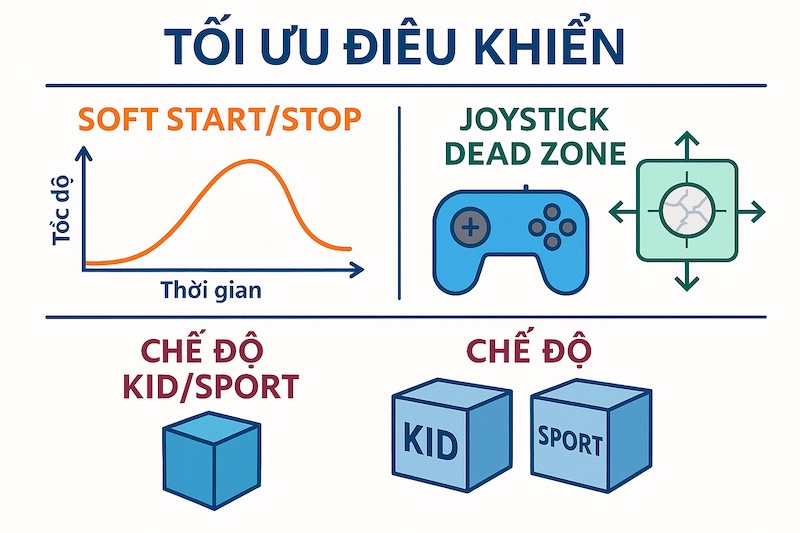
| Điều khiển tốc độ mượt (Soft Start/Stop) | Tránh giật khi khởi động/dừng | Dùng hàm tăng tốc/tăng giảm PWM dần theo thời gian |
| Độ nhạy tay cầm | Kiểm soát mượt khi dùng joystick | Dùng hàm map() và giới hạn “dead zone” |
| Chế độ điều khiển | Phù hợp từng người dùng | Tạo “Kid mode” (chậm) và “Sport mode” (nhạy) |
| Cân bằng bánh xe | Giảm lệch hướng khi đi thẳng | Tinh chỉnh hệ số PWM hai bánh |
⚙️ 3. Làm mượt tốc độ – Soft Start / Stop

Khi thay đổi hướng hoặc tốc độ đột ngột, mô-men xoắn của động cơ DC có thể làm xe giật hoặc trượt.
Giải pháp là thay đổi PWM từ từ bằng cách nội suy giữa tốc độ hiện tại và mục tiêu.
? Code ví dụ:
int currentSpeedL = 0, currentSpeedR = 0;

void smoothDrive(int targetL, int targetR) {
  int step = 5; // mức tăng/giảm PWM mỗi chu kỳ
  if (currentSpeedL < targetL) currentSpeedL += step;
  else if (currentSpeedL > targetL) currentSpeedL -= step;

  if (currentSpeedR < targetR) currentSpeedR += step;
  else if (currentSpeedR > targetR) currentSpeedR -= step;

  ledcWrite(0, constrain(currentSpeedL, 0, 255));
  ledcWrite(1, constrain(currentSpeedR, 0, 255));
}
✅ Ưu điểm:
- Xe di chuyển mượt mà hơn.
- Giảm dòng khởi động đột ngột → tiết kiệm pin.
- Giảm áp lực cơ học lên bánh và trục motor.
? 4. Tối ưu độ nhạy Joystick – Dead Zone & Mapping
Khi joystick ở vị trí gần trung tâm, giá trị đọc có thể dao động nhẹ khiến robot di chuyển không mong muốn.
Ta thêm “vùng chết (dead zone)” để loại bỏ nhiễu.
? Code tay cầm:
int joyY = analogRead(1); // 0–4095
int deadZone = 300;

if (abs(joyY - 2048) < deadZone) joyY = 2048; // giữ nguyên ở giữa

// Map sang tốc độ PWM
int speed = map(joyY, 0, 4095, 120, 255);
? Kết quả: Tay cầm phản hồi mượt hơn, không rung nhẹ khi không chạm joystick.
? 5. Thêm chế độ điều khiển (Mode Switch)
Để phù hợp với từng đối tượng (người mới học – người đã quen), ta thêm 2 chế độ:
- Kid Mode: tốc độ giới hạn, dễ điều khiển.
- Sport Mode: phản hồi nhanh, tốc độ tối đa.
? Code ví dụ:
#define BTN_MODE 12
bool sportMode = false;

void loop() {
  if (!digitalRead(BTN_MODE)) {
    sportMode = !sportMode;
    delay(300); // chống dội phím
  }

  int joyY = analogRead(1);
  int speed = map(joyY, 0, 4095, 100, sportMode ? 255 : 180);
}
? Khi bật/tắt mode, hiển thị LED hoặc OLED để báo trạng thái.
⚙️ 6. Cân bằng động cơ hai bánh
Trong thực tế, hai bánh xe có thể khác nhau về ma sát hoặc mô-men, khiến robot đi lệch dù lệnh là “tiến thẳng”.
Giải pháp: nhân hệ số cân bằng cho mỗi bánh.
? Code:
#define MOTOR_L_FACTOR 1.00
#define MOTOR_R_FACTOR 0.95

int leftPWM = targetSpeed * MOTOR_L_FACTOR;
int rightPWM = targetSpeed * MOTOR_R_FACTOR;
smoothDrive(leftPWM, rightPWM);
⚖️ Dùng thực nghiệm để tinh chỉnh cho xe chạy thẳng đều.
? Code mới nhất:
tx_controller.ino — ESP32-C3 + NRF24L01 (Tay cầm)
#include <SPI.h>
#include <RF24.h>

// ================== NRF24 PINS (ESP32-C3) ==================
#define CE_PIN   7
#define CSN_PIN 10

// ================== INPUT PINS ==================
#define BTN_F   2
#define BTN_B   3
#define BTN_L   8
#define BTN_R   9
#define BTN_MODE 12            // Nhấn để chuyển Kid/Sport
#define JOY_Y    1             // Analog Y (0..4095)

// ================== RF CONFIG ==================
RF24 radio(CE_PIN, CSN_PIN);
const byte pipeAddr[6] = "ROBOT";

struct Command {
  char action;     // 'F','B','L','R','S'
  uint8_t speed;   // 0..255
};
Command cmd;

// ================== STATE ==================
bool sportMode = false;        // false = Kid, true = Sport
unsigned long lastModeToggle = 0;

// ================== HELPERS ==================
static inline bool pressed(uint8_t pin) { return !digitalRead(pin); }

char readAction() {
  if (pressed(BTN_F)) return 'F';
  if (pressed(BTN_B)) return 'B';
  if (pressed(BTN_L)) return 'L';
  if (pressed(BTN_R)) return 'R';
  return 'S';
}

uint8_t mapSpeedFromJoystick(bool sport) {
  // Dead zone quanh 2048
  const int center = 2048;
  const int dead   = 300;

  int raw = analogRead(JOY_Y); // 0..4095
  if (abs(raw - center) < dead) return 0; // coi như thả tay

  // Map 0..4095 -> 100..(180|255)
  int maxOut = sport ? 255 : 180;
  int sp = map(raw, 0, 4095, 100, maxOut);
  sp = constrain(sp, 0, 255);
  return (uint8_t)sp;
}

void setup() {
  Serial.begin(115200);

  pinMode(BTN_F, INPUT_PULLUP);
  pinMode(BTN_B, INPUT_PULLUP);
  pinMode(BTN_L, INPUT_PULLUP);
  pinMode(BTN_R, INPUT_PULLUP);
  pinMode(BTN_MODE, INPUT_PULLUP);
  analogReadResolution(12);

  SPI.begin();
  radio.begin();
  radio.setChannel(100);
  radio.setDataRate(RF24_1MBPS);
  radio.setPALevel(RF24_PA_LOW);
  radio.setAutoAck(true);
  radio.enableDynamicPayloads();
  radio.openWritingPipe(pipeAddr);
  radio.stopListening();

  Serial.println("TX Ready (C3 + NRF24) | Mode: KID");
}

void loop() {
  // Toggle Kid/Sport
  if (pressed(BTN_MODE) && (millis() - lastModeToggle > 250)) {
    sportMode = !sportMode;
    lastModeToggle = millis();
    Serial.printf("Mode: %s\n", sportMode ? "SPORT" : "KID");
  }

  cmd.action = readAction();
  cmd.speed  = (cmd.action == 'S') ? 0 : mapSpeedFromJoystick(sportMode);

  // Nếu không dùng joystick: dùng ga mặc định
  if (cmd.speed == 0 && cmd.action != 'S') {
    cmd.speed = sportMode ? 200 : 150;
  }

  radio.write(&cmd, sizeof(cmd));
  // Debug gọn để không spam
  // Serial.printf("Send %c (%u)\n", cmd.action, cmd.speed);

  delay(20); // ~50Hz
}
rx_robot.ino — ESP32 DevKit 38-pin + NRF24L01 + L298N (Xe)
#include <SPI.h>
#include <RF24.h>

// ================== NRF24 PINS (ESP32 DevKit) ==================
#define CE_PIN   17
#define CSN_PIN  16

RF24 radio(CE_PIN, CSN_PIN);
const byte pipeAddr[6] = "ROBOT";

// ================== MOTOR PINS (L298N) ==================
#define IN1 26
#define IN2 27
#define IN3 25
#define IN4 33
#define ENA 14   // PWM Left
#define ENB 32   // PWM Right

// ================== OPTIONAL ALERT ==================
// #define LED_STATUS 2
// #define BUZZER     13

// ================== PACKET ==================
struct Command {
  char action;    // 'F','B','L','R','S'
  uint8_t speed;  // 0..255
};
Command cmd;

// ================== CONTROL STATE ==================
int currentSpeedL = 0, currentSpeedR = 0;     // PWM hiện tại
int targetSpeedL  = 0, targetSpeedR  = 0;     // PWM mục tiêu
bool dirLForward  = true, dirRForward = true; // hướng

// Cân bằng hai bánh (tinh chỉnh thực tế)
#define MOTOR_L_FACTOR 1.00
#define MOTOR_R_FACTOR 0.95

// Failsafe
unsigned long lastPacketMs = 0;

// ================== HELPERS ==================
void setupPWMs() {
  ledcSetup(0, 5000, 8); ledcAttachPin(ENA, 0);
  ledcSetup(1, 5000, 8); ledcAttachPin(ENB, 1);
}

void setMotorDir(bool leftFwd, bool rightFwd) {
  // Left
  digitalWrite(IN1, leftFwd ? HIGH : LOW);
  digitalWrite(IN2, leftFwd ? LOW  : HIGH);
  // Right
  digitalWrite(IN3, rightFwd ? HIGH : LOW);
  digitalWrite(IN4, rightFwd ? LOW  : HIGH);
}

void applyPWM(int leftPWM, int rightPWM) {
  ledcWrite(0, constrain(leftPWM, 0, 255));
  ledcWrite(1, constrain(rightPWM, 0, 255));
}

void smoothDriveStep() {
  const int step = 6; // speed ramp step

  if (currentSpeedL < targetSpeedL) currentSpeedL += step;
  else if (currentSpeedL > targetSpeedL) currentSpeedL -= step;

  if (currentSpeedR < targetSpeedR) currentSpeedR += step;
  else if (currentSpeedR > targetSpeedR) currentSpeedR -= step;

  applyPWM(currentSpeedL, currentSpeedR);
}

void stopNow() {
  targetSpeedL = targetSpeedR = 0;
  setMotorDir(true, true);
}

void handleCommand(const Command& c) {
  // Base speed + balance
  int baseL = (int)(c.speed * MOTOR_L_FACTOR);
  int baseR = (int)(c.speed * MOTOR_R_FACTOR);

  switch (c.action) {
    case 'F': // Forward
      dirLForward = true;  dirRForward = true;
      targetSpeedL = baseL; targetSpeedR = baseR;
      break;
    case 'B': // Backward
      dirLForward = false; dirRForward = false;
      targetSpeedL = baseL; targetSpeedR = baseR;
      break;
    case 'L': // Turn Left (left backward, right forward)
      dirLForward = false; dirRForward = true;
      targetSpeedL = baseL; targetSpeedR = baseR;
      break;
    case 'R': // Turn Right (left forward, right backward)
      dirLForward = true;  dirRForward = false;
      targetSpeedL = baseL; targetSpeedR = baseR;
      break;
    default:  // 'S' or unknown
      stopNow();
      break;
  }

  setMotorDir(dirLForward, dirRForward);
}

void setup() {
  Serial.begin(115200);

  pinMode(IN1, OUTPUT); pinMode(IN2, OUTPUT);
  pinMode(IN3, OUTPUT); pinMode(IN4, OUTPUT);
  setupPWMs();

  // if defined(LED_STATUS) pinMode(LED_STATUS, OUTPUT);
  // if defined(BUZZER)     pinMode(BUZZER, OUTPUT);

  SPI.begin();
  radio.begin();
  radio.setChannel(100);
  radio.setDataRate(RF24_1MBPS);
  radio.setPALevel(RF24_PA_LOW);
  radio.setAutoAck(true);
  radio.enableDynamicPayloads();
  radio.openReadingPipe(1, pipeAddr);
  radio.startListening();

  setMotorDir(true, true);
  applyPWM(0, 0);

  Serial.println("RX Ready (DevKit + NRF24 + L298N)");
}

void loop() {
  // Nhận lệnh
  if (radio.available()) {
    radio.read(&cmd, sizeof(cmd));
    lastPacketMs = millis();

    handleCommand(cmd);
    // Serial.printf("Recv %c (%u)\n", cmd.action, cmd.speed);
  }

  // Failsafe: nếu >300ms không có gói → dừng
  if (millis() - lastPacketMs > 300) {
    stopNow();
  }

  // Ramp mượt mỗi vòng lặp
  smoothDriveStep();

  delay(10); // tăng nhịp mượt mà (100 Hz ramp)
}
Ghi chú nhanh
- TX (C3): giữ nguyên nút F/B/L/R, thêm nút MODE (Kid/Sport), Dead Zone cho joystick, gửi ~50Hz.
- RX (DevKit): Soft Start/Stop (ramp), cân bằng bánh, failsafe 300ms, định hướng bánh theo lệnh.
- Nguồn & nhiễu: nhớ tụ 10µF + 100nF sát NRF24L01; mass chung; đường SPI ngắn.
? 7. Kiểm thử sau khi tối ưu
- Quan sát xe khi khởi động và dừng – có mượt không.
- Kiểm tra joystick trung tâm – xe có đứng yên ổn định.
- Chuyển chế độ Kid/Sport – tốc độ có thay đổi đúng mong muốn.
- Chạy thẳng 3–5m – kiểm tra lệch hướng.
? 8. Kết quả mong đợi
Sau khi áp dụng các kỹ thuật tối ưu:
- Xe khởi động và dừng êm ái, không giật.
- Điều khiển phản hồi nhanh và chính xác.
- Tốc độ được điều chỉnh mượt theo joystick.
- Hệ thống hoạt động ổn định, dễ lái, thân thiện với người dùng.
? 9. Bước tiếp theo
Trong (phần 5): Báo hiệu thông minh, chúng ta sẽ học cách thêm LED và Buzzer để robot phản hồi bằng ánh sáng và âm thanh – giúp người điều khiển nhận biết trạng thái robot trong thời gian thực.
Leave a Reply