
Series: Lập trình Raspberry Pi & Ứng dụng thực tế Phần 2 — Lập trình GPIO & phần cứng Bài 8: Đọc DHT22/BME280 và lưu log dữ liệu (nhiệt độ/độ ẩm) theo thời gian
1) Mục tiêu bài học
Sau bài này bạn sẽ:
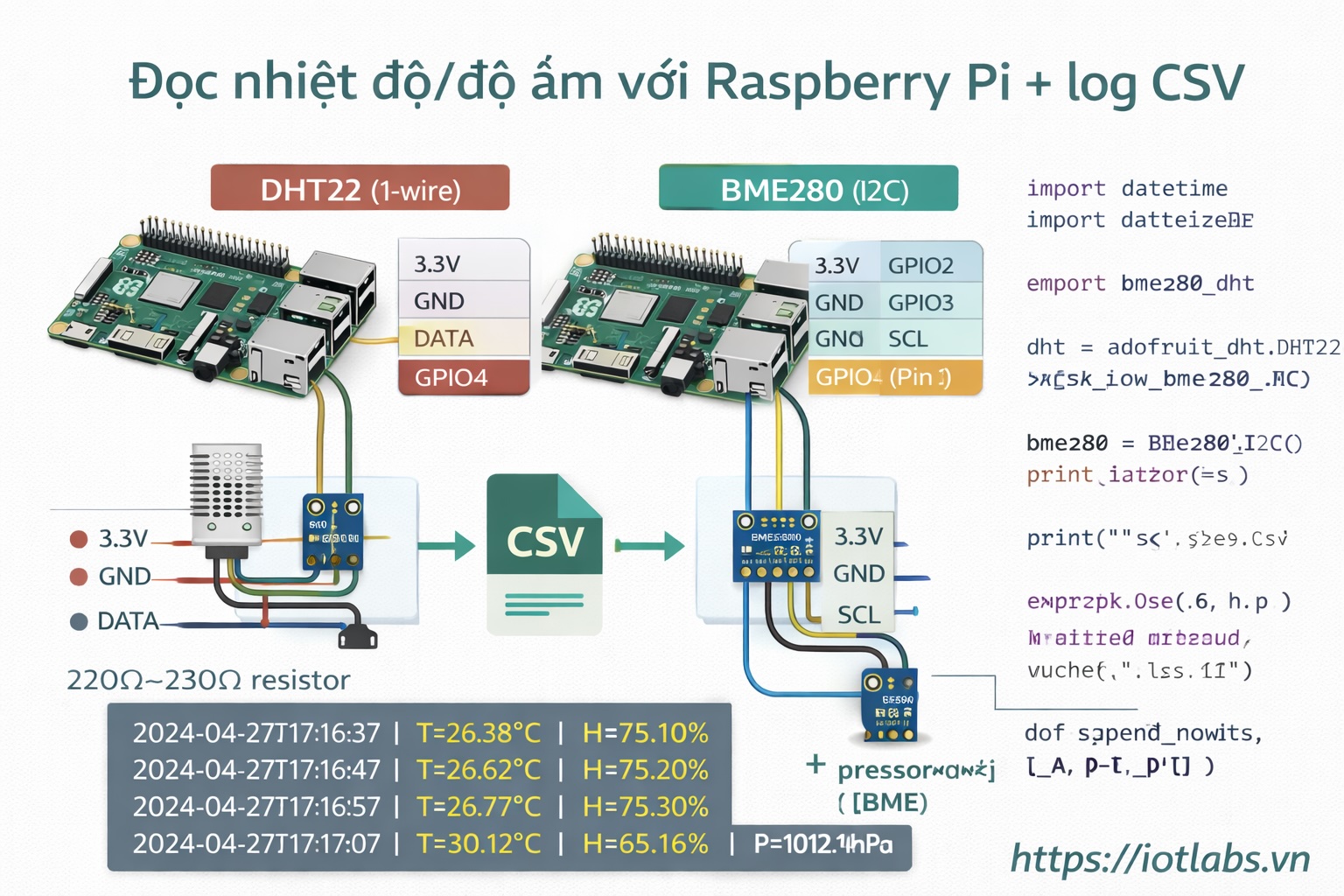
- Đọc sensor DHT22 hoặc BME280 trên Raspberry Pi.
- Chuẩn hoá dữ liệu: ts, temperature, humidity (BME280 có thêm pressure).
- Lưu log ra CSV + in console để debug.
- Chạy ổn định theo chu kỳ (ví dụ mỗi 10 giây).
Gợi ý: nếu bạn có BME280 (I2C) thì ưu tiên BME280 vì ổn định hơn, dễ scan địa chỉ (bài 7).
2) Phần cứng & wiring
A) BME280 (I2C) — khuyến nghị
- VCC → 3.3V (Pin 1)
- GND → GND (Pin 6)
- SDA → GPIO2 (Pin 3)
- SCL → GPIO3 (Pin 5)
Kiểm tra địa chỉ:
sudo i2cdetect -y 1Thường sẽ thấy 0x76 hoặc 0x77.
B) DHT22 (1-wire kiểu GPIO)
- VCC → 3.3V
- GND → GND
- DATA → GPIO4 (Pin 7) (gợi ý)
- Nếu module rời (không có board), thường cần điện trở kéo 4.7k–10k từ DATA lên 3.3V.
3) Cài thư viện
Nếu dùng BME280
sudo apt update
sudo apt -y install python3-pip python3-smbus i2c-tools
pip3 install adafruit-circuitpython-bme280
Nếu dùng DHT22
sudo apt update
sudo apt -y install python3-pip
pip3 install adafruit-circuitpython-dht
sudo apt -y install libgpiod2
4) Code mẫu: logger ra CSV (dùng BME280)
Tạo thư mục:
mkdir -p ~/apps/sensor-logger
cd ~/apps/sensor-logger
nano bme280_logger.py
Dán code:
import time
import csv
from datetime import datetime

import board
import adafruit_bme280

LOG_FILE = "bme280_log.csv"
INTERVAL_SEC = 10

def init_sensor():
    i2c = board.I2C()
    sensor = adafruit_bme280.Adafruit_BME280_I2C(i2c)
    # Nếu sensor báo sai, bạn có thể set sea_level_pressure cho đúng khu vực
    # sensor.sea_level_pressure = 1013.25
    return sensor

def ensure_csv_header():
    try:
        with open(LOG_FILE, "x", newline="") as f:
            w = csv.writer(f)
            w.writerow(["ts", "temperature_c", "humidity_pct", "pressure_hpa"])
    except FileExistsError:
        pass

def append_row(ts, t, h, p):
    with open(LOG_FILE, "a", newline="") as f:
        w = csv.writer(f)
        w.writerow([ts, f"{t:.2f}", f"{h:.2f}", f"{p:.2f}"])

def main():
    sensor = init_sensor()
    ensure_csv_header()

    print("BME280 logger started. Writing to", LOG_FILE)
    while True:
        ts = datetime.now().isoformat(timespec="seconds")
        t = sensor.temperature
        h = sensor.humidity
        p = sensor.pressure

        print(f"{ts} | T={t:.2f}°C | H={h:.2f}% | P={p:.2f}hPa")
        append_row(ts, t, h, p)

        time.sleep(INTERVAL_SEC)

if __name__ == "__main__":
    main()
Chạy:
python3 bme280_logger.pyXem file CSV:
tail -n 5 bme280_log.csv5) Code mẫu: logger ra CSV (dùng DHT22)
Tạo file:
nano dht22_logger.pyDán code:
import time
import csv
from datetime import datetime

import board
import adafruit_dht

LOG_FILE = "dht22_log.csv"
INTERVAL_SEC = 10

def ensure_csv_header():
    try:
        with open(LOG_FILE, "x", newline="") as f:
            w = csv.writer(f)
            w.writerow(["ts", "temperature_c", "humidity_pct"])
    except FileExistsError:
        pass

def append_row(ts, t, h):
    with open(LOG_FILE, "a", newline="") as f:
        w = csv.writer(f)
        w.writerow([ts, f"{t:.2f}", f"{h:.2f}"])

def main():
    # GPIO4 (Pin 7) - bạn có thể đổi nếu cần
    dht = adafruit_dht.DHT22(board.D4)
    ensure_csv_header()

    print("DHT22 logger started. Writing to", LOG_FILE)

    while True:
        ts = datetime.now().isoformat(timespec="seconds")
        try:
            t = dht.temperature
            h = dht.humidity

            if t is not None and h is not None:
                print(f"{ts} | T={t:.2f}°C | H={h:.2f}%")
                append_row(ts, t, h)
            else:
                print(f"{ts} | read failed (None)")
        except RuntimeError as e:
            # DHT hay bị lỗi đọc lặt vặt, xử lý bằng retry
            print(f"{ts} | read error: {e}")
        time.sleep(INTERVAL_SEC)

if __name__ == "__main__":
    main()
Chạy:
python3 dht22_logger.py6) Lỗi thường gặp & cách xử lý
BME280
- i2cdetect không thấy: quay lại Bài 7 (enable I2C + wiring SDA/SCL + GND chung)
- Thấy 0x76/0x77 nhưng code lỗi: kiểm tra dây nguồn 3.3V, đổi module khác
DHT22
- Lỗi RuntimeError thường xuyên: bình thường (DHT “khó chiều”), tăng INTERVAL_SEC lên 15–30 giây
- Humidity/temperature None: wiring DATA hoặc thiếu pull-up
7) Bài tập nâng cấp
- Thêm cột device_id vào CSV (ví dụ hostname).
- Log thêm uptime_sec (tính từ lúc start).
- Chạy logger bằng systemd service (áp dụng Bài 3) để tự chạy khi boot.