
Series: Lập trình Raspberry Pi & Ứng dụng thực tế Phần 1 — Nền tảng Raspberry Pi Bài 5: Git + Deploy nhanh trên Raspberry Pi (pull → build → restart service)
1) Mục tiêu bài học
Sau bài này bạn sẽ có một quy trình deploy “chuẩn dự án thật” trên Pi:
- Code nằm trên Git (GitHub/GitLab/self-host)
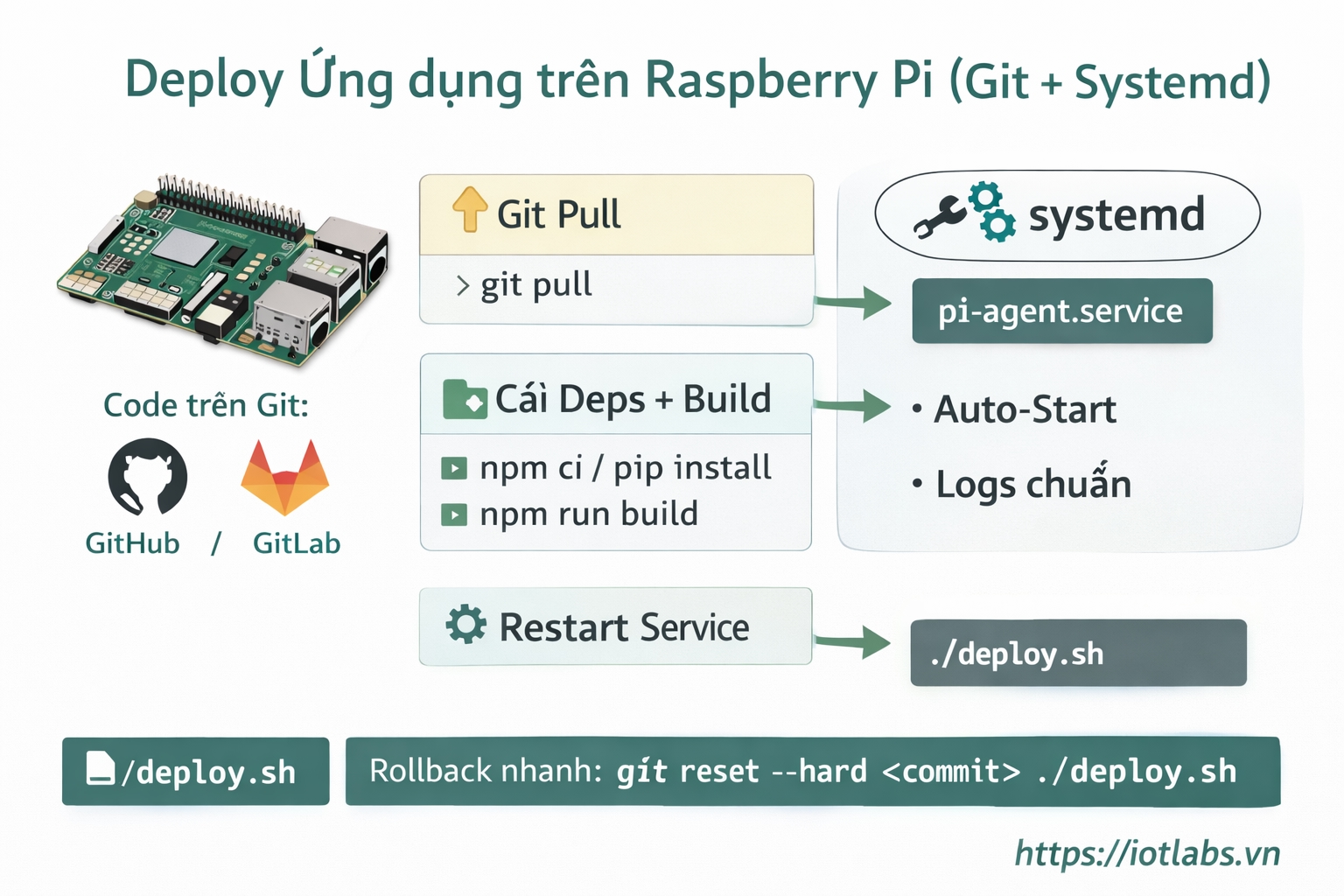
- Mỗi lần cập nhật chỉ cần: pull → build → restart
- Có thể gom thành 1 lệnh deploy để chạy siêu nhanh
2) Chuẩn bị
- Raspberry Pi đã cài OS + SSH (Bài 2)
- systemd service đã biết tạo (Bài 3)
- Internet ổn, hostname/IP ổn (Bài 4)
Cài các tool cần thiết:
sudo apt update
sudo apt -y install git curl
3) Clone repo về Pi (cấu trúc thư mục gợi ý)
Mình khuyên để code ở:
- /home/developer/apps/<ten-app>
Ví dụ:
mkdir -p ~/apps
cd ~/apps
git clone <REPO_URL> iotlabs-pi-agent
cd iotlabs-pi-agent
Kiểm tra:
git status4) Mẫu triển khai cho 2 kiểu project phổ biến
A) Python (venv)
Tạo venv (1 lần):
cd ~/apps/iotlabs-pi-agent
python3 -m venv .venv
source .venv/bin/activate
pip install -r requirements.txt
Khi deploy: chỉ cần update + pip install nếu cần:
git pull
source .venv/bin/activate
pip install -r requirements.txt
sudo systemctl restart iotlabs-pi-agent
Tip: nếu requirements ít đổi, pip sẽ rất nhanh.
B) Node.js/TypeScript
Cài Node (khuyến nghị Node LTS bằng NodeSource hoặc nvm — tuỳ bạn).
Giả sử bạn đã có Node + npm.
Lần đầu:
cd ~/apps/iotlabs-pi-agent
npm ci
npm run build
Deploy:
git pull
npm ci
npm run build
sudo systemctl restart iotlabs-pi-agent
Nếu project không có build (pure JS), bỏ bước npm run build.
5) Kết nối systemd với “binary/entry” đúng cách
Ví dụ Node build ra dist/index.js, service nên trỏ đúng:
/etc/systemd/system/iotlabs-pi-agent.service
[Service]
User=developer
WorkingDirectory=/home/developer/apps/iotlabs-pi-agent
ExecStart=/usr/bin/node /home/developer/apps/iotlabs-pi-agent/dist/index.js
Restart=always
RestartSec=3
Sau khi sửa service:
sudo systemctl daemon-reload
sudo systemctl restart iotlabs-pi-agent
sudo systemctl status iotlabs-pi-agent --no-pager
6) Deploy bằng 1 lệnh (deploy.sh)
Tạo script:
cd ~/apps/iotlabs-pi-agent
nano deploy.sh
Bản deploy.sh cho Node/TS (mẫu)
#!/usr/bin/env bash
set -euo pipefail

APP_NAME="iotlabs-pi-agent"
APP_DIR="/home/developer/apps/iotlabs-pi-agent"
SERVICE_NAME="iotlabs-pi-agent"

cd "$APP_DIR"

echo "[1/4] git pull..."
git pull --rebase

echo "[2/4] install deps..."
npm ci

echo "[3/4] build..."
npm run build

echo "[4/4] restart service..."
sudo systemctl restart "$SERVICE_NAME"

echo "✅ Deploy done. Status:"
sudo systemctl status "$SERVICE_NAME" --no-pager | head -n 15
Cấp quyền chạy:
chmod +x deploy.shChạy deploy:
./deploy.sh7) Best practice thực chiến
- Không chạy app bằng root: luôn dùng user riêng (ví dụ developer)
- Không commit secrets: dùng .env và EnvironmentFile= trong systemd
- Log rõ ràng: in phiên bản commit để biết đang chạy build nào:
git rev-parse --short HEAD
- Rollback nhanh (khi lỗi):
git log --oneline -n 10
git reset --hard <commit>
./deploy.sh
8) Checklist debug nhanh
- git pull bị conflict → dùng git pull –rebase hoặc reset lại branch (cẩn thận nếu có sửa local)
- npm ci fail vì thiếu RAM → tăng swap (Bài 2) hoặc dùng Pi mạnh hơn
- Service restart nhưng không lên:
journalctl -u iotlabs-pi-agent -n 80 --no-pager9) Bài tập nâng cấp
- Tạo deploy.sh cho project của bạn và chạy deploy thành công.
- In ra GIT_SHA trong log app khi start (để truy vết phiên bản).
- Thử rollback về commit cũ khi build lỗi.