
Series: Lập trình Raspberry Pi & Ứng dụng thực tế Phần 3 — Python “build app thật” Bài 15: Lưu trữ dữ liệu — SQLite → Postgres (khi nào nâng cấp, code mẫu, migration nhẹ)
1) Mục tiêu bài học
Sau bài này bạn sẽ:
- Lưu dữ liệu sensor/telemetry vào SQLite (nhẹ, chạy ngay trên Pi).
- Biết dấu hiệu khi nào cần nâng cấp lên PostgreSQL.
- Có code Python mẫu để:
- tạo bảng
- insert record
- query dữ liệu gần nhất
- Gợi ý cách “migrate nhẹ” từ SQLite sang Postgres.
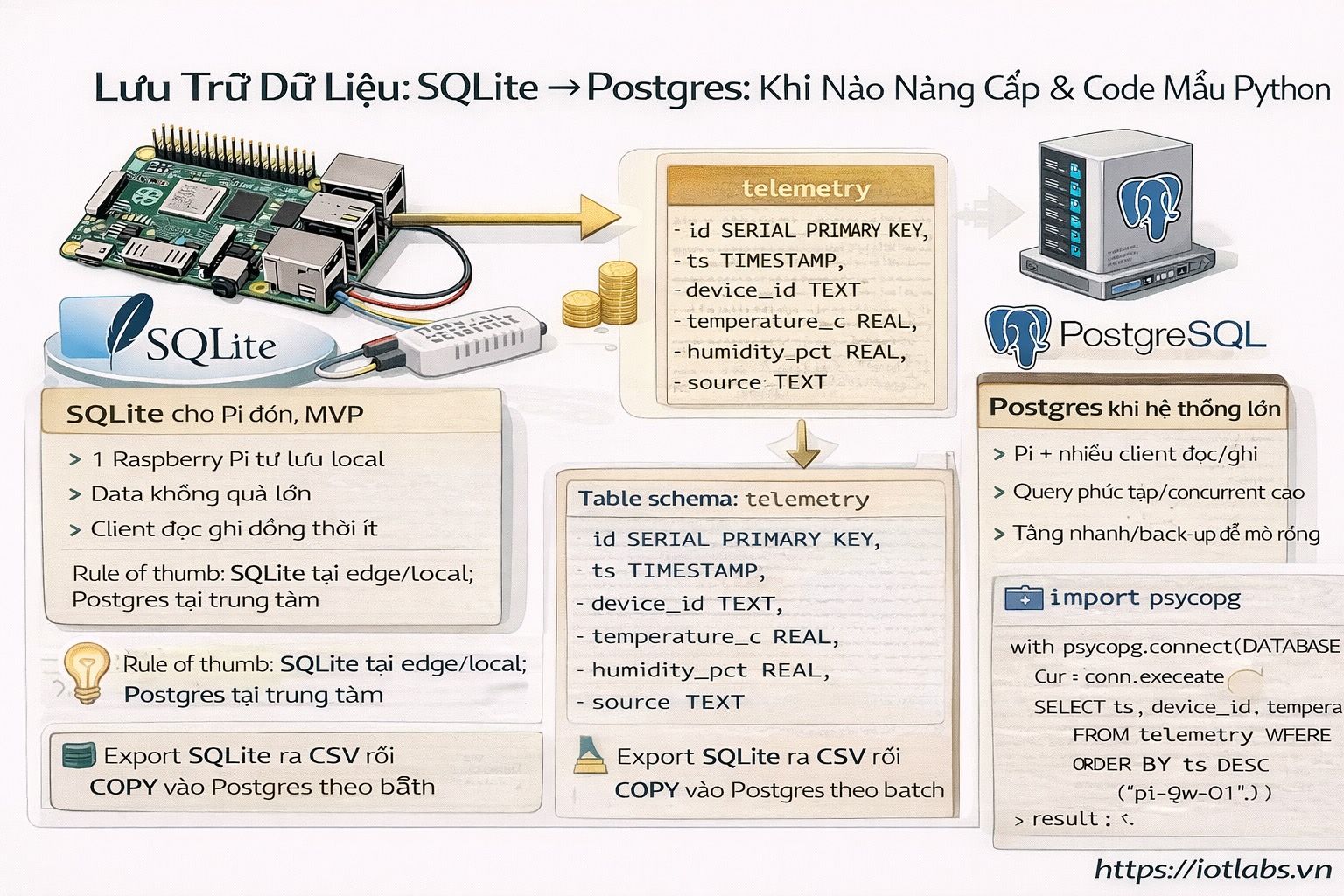
2) Khi nào dùng SQLite, khi nào chuyển Postgres?
SQLite (khuyến nghị cho Pi đơn, MVP)
Dùng khi:
- 1 thiết bị Pi tự lưu dữ liệu local
- Data không quá lớn (vài trăm ngàn record vẫn OK nếu thiết kế tốt)
- Không có nhiều client query đồng thời
Postgres (khi bạn bắt đầu “làm hệ thống”)
Chuyển khi:
- Nhiều service cùng đọc/ghi
- Cần query phức tạp, index nhiều, concurrent cao
- Muốn backup/replication, vận hành lâu dài
- Dữ liệu tăng nhanh hoặc cần truy vấn dashboard liên tục
Rule of thumb:
SQLite cho edge/local; Postgres cho trung tâm (hoặc gateway lớn).
3) Thiết kế schema tối thiểu (telemetry)
Ta lưu bảng telemetry:
- id (auto)
- ts (timestamp ISO)
- device_id
- temperature_c
- humidity_pct
- source (bme280/dht22/demo)
4) SQLite: code chạy ngay (không cần cài DB server)
Tạo file src/storage_sqlite.py:
cd ~/apps/iotlabs-py-agent
nano src/storage_sqlite.py
Dán code:
import os
import sqlite3
from typing import Optional, Dict, Any

DB_PATH = os.getenv("SQLITE_PATH", "data/telemetry.db")

SCHEMA_SQL = """
CREATE TABLE IF NOT EXISTS telemetry (
  id INTEGER PRIMARY KEY AUTOINCREMENT,
  ts TEXT NOT NULL,
  device_id TEXT NOT NULL,
  temperature_c REAL,
  humidity_pct REAL,
  source TEXT
);

CREATE INDEX IF NOT EXISTS idx_telemetry_device_ts
ON telemetry(device_id, ts);
"""

def ensure_db():
    os.makedirs(os.path.dirname(DB_PATH), exist_ok=True)
    with sqlite3.connect(DB_PATH) as conn:
        conn.executescript(SCHEMA_SQL)

def insert_telemetry(row: Dict[str, Any]):
    with sqlite3.connect(DB_PATH) as conn:
        conn.execute(
            "INSERT INTO telemetry(ts, device_id, temperature_c, humidity_pct, source) VALUES(?,?,?,?,?)",
            (row["ts"], row["device_id"], row.get("temperature_c"), row.get("humidity_pct"), row.get("source"))
        )
        conn.commit()

def latest_telemetry(device_id: str) -> Optional[Dict[str, Any]]:
    with sqlite3.connect(DB_PATH) as conn:
        cur = conn.execute(
            "SELECT ts, device_id, temperature_c, humidity_pct, source FROM telemetry WHERE device_id=? ORDER BY ts DESC LIMIT 1",
            (device_id,)
        )
        r = cur.fetchone()
        if not r:
            return None
        return {
            "ts": r[0],
            "device_id": r[1],
            "temperature_c": r[2],
            "humidity_pct": r[3],
            "source": r[4],
        }
Tạo thư mục data/:
mkdir -p data5) Demo: ghi 1 record + đọc lại
Tạo file scripts/sqlite_demo.py:
mkdir -p scripts
nano scripts/sqlite_demo.py
Dán:
from datetime import datetime
from src.storage_sqlite import ensure_db, insert_telemetry, latest_telemetry

def main():
    ensure_db()

    row = {
        "ts": datetime.now().isoformat(timespec="seconds"),
        "device_id": "pi-gw-01",
        "temperature_c": 26.5,
        "humidity_pct": 70.2,
        "source": "demo",
    }
    insert_telemetry(row)

    last = latest_telemetry("pi-gw-01")
    print("latest:", last)

if __name__ == "__main__":
    main()
Chạy:
source .venv/bin/activate
python scripts/sqlite_demo.py
6) Tích hợp vào FastAPI /metrics(gợi ý)
Trong src/api.py, bạn có thể import latest_telemetry() và thêm vào response.
Ví dụ (ý tưởng):
- /metrics trả thêm last_telemetry để dashboard mobile/web đọc nhanh.
7) Postgres: chuẩn bị khi cần (tóm tắt triển khai)
Cài Postgres trên Pi (nhẹ, dùng cho lab)
sudo apt update
sudo apt -y install postgresql
Tạo DB + user (ví dụ):
sudo -u postgres psqlTrong psql:
CREATE USER iotlabs WITH PASSWORD 'strong_password';
CREATE DATABASE iotlabs_db OWNER iotlabs;
\q
Thực chiến hệ IoTLabs: Postgres thường chạy ở server riêng/cluster, Pi chỉ là edge.
8) Code Postgres tối giản (psycopg)
Cài:
source .venv/bin/activate
pip install psycopg[binary]
Tạo src/storage_postgres.py (mẫu tối giản):
- Kết nối qua DATABASE_URL
- Schema tương tự SQLite
(Bài sau khi cần mình sẽ mở rộng đầy đủ: pool, retry, migrations chuẩn hơn.)
9) “Migration nhẹ” SQLite → Postgres
Cách đơn giản, ít phụ thuộc:
- Export từ SQLite ra CSV:
- query SELECT … rồi ghi CSV bằng Python
- Import vào Postgres:
- dùng COPY telemetry FROM STDIN WITH CSV HEADER
Hoặc viết script Python:
- đọc SQLite
- batch insert sang Postgres theo 500–1000 rows/lần
10) Bài tập nâng cấp
- Thay “demo telemetry” bằng dữ liệu thật từ BME280 (Bài 8).
- Tạo endpoint GET /telemetry/latest?device_id=… trả record mới nhất từ SQLite.
- Thêm index theo ts nếu bạn query theo khoảng thời gian.
SEO (chuẩn đăng blog)
- Meta keyphrase: sqlite raspberry pi lưu telemetry nâng cấp postgres
- Meta description (≤155 từ): Hướng dẫn lưu dữ liệu sensor/telemetry trên Raspberry Pi bằng SQLite: thiết kế bảng, tạo index, insert và query record mới nhất bằng Python. Giải thích khi nào cần nâng cấp lên PostgreSQL và gợi ý cách migrate dữ liệu từ SQLite sang Postgres theo batch/CSV để vận hành lâu dài.
- Excerpt: Lưu telemetry trên Pi bằng SQLite để chạy nhanh, và chuẩn bị đường nâng cấp lên Postgres khi hệ thống lớn dần.