
Series: Lập trình Raspberry Pi & Ứng dụng thực tế Phần 3 — Python “build app thật” Bài 12: Project structure Python trên Pi (venv, config, logging) — làm chuẩn để chạy 24/7
1) Mục tiêu bài học
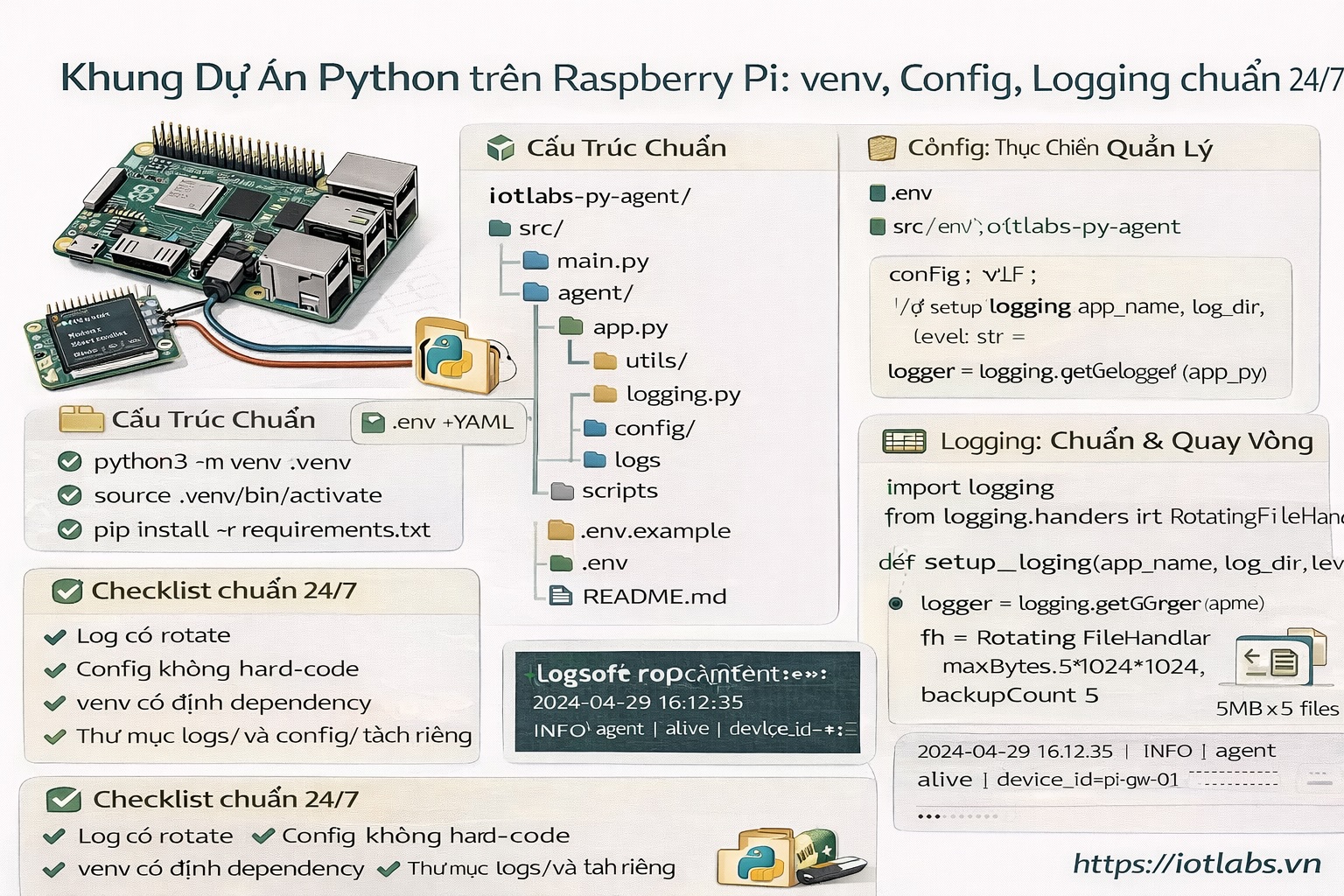
Sau bài này bạn sẽ có “khung dự án Python” đúng chuẩn production trên Raspberry Pi:
- Cấu trúc thư mục rõ ràng (src, config, logs, scripts)
- Dùng venv (cô lập dependency)
- Có config qua .env và/hoặc file config.yaml
- Logging chuẩn (console + file, rotate) để chạy 24/7 không đầy đĩa
2) Tạo project skeleton
Tạo thư mục:
mkdir -p ~/apps
cd ~/apps
mkdir -p iotlabs-py-agent
cd iotlabs-py-agent
Tạo cấu trúc:
mkdir -p src/agent src/utils config logs scripts
touch src/__init__.py src/agent/__init__.py
touch src/main.py src/agent/app.py src/utils/logging.py
touch config/config.yaml .env.example README.md
Gợi ý structure:
iotlabs-py-agent/
  src/
    main.py
    agent/
      app.py
    utils/
      logging.py
  config/
    config.yaml
  logs/
  scripts/
  .env.example
  README.md
3) Tạo venv + cài dependencies
python3 -m venv .venv
source .venv/bin/activate
pip install --upgrade pip
pip install python-dotenv pyyaml
Nếu bạn dùng sensor/OLED/MQTT thì bài sau sẽ cài thêm.
4) Config: dùng .env + YAML (thực chiến)
4.1 .env.example
Mở file:
nano .env.exampleDán:
APP_NAME=iotlabs-py-agent
LOG_LEVEL=INFO
LOG_DIR=logs
CONFIG_YAML=config/config.yaml
Tạo .env thật (copy):
cp .env.example .env4.2 config/config.yaml
nano config/config.yamlDán:
device:
  id: "pi-gw-01"
  location: "lab"

runtime:
  loop_interval_sec: 5

features:
  enable_demo_log: true
5) Logging chuẩn: console + file + rotate
Tạo file src/utils/logging.py:
nano src/utils/logging.pyDán code:
import logging
import os
from logging.handlers import RotatingFileHandler

def setup_logging(app_name: str, log_dir: str, level: str = "INFO") -> logging.Logger:
    os.makedirs(log_dir, exist_ok=True)

    logger = logging.getLogger(app_name)
    logger.setLevel(getattr(logging, level.upper(), logging.INFO))
    logger.propagate = False

    fmt = logging.Formatter(
        fmt="%(asctime)s | %(levelname)s | %(name)s | %(message)s",
        datefmt="%Y-%m-%d %H:%M:%S",
    )

    # tránh add handler nhiều lần khi reload
    if not logger.handlers:
        # console
        ch = logging.StreamHandler()
        ch.setFormatter(fmt)
        logger.addHandler(ch)

        # file rotate: 5MB x 5 files
        fh = RotatingFileHandler(
            filename=os.path.join(log_dir, f"{app_name}.log"),
            maxBytes=5 * 1024 * 1024,
            backupCount=5,
        )
        fh.setFormatter(fmt)
        logger.addHandler(fh)

    return logger
6) App core: đọc config + chạy loop
6.1 src/agent/app.py
nano src/agent/app.pyDán:
import time
from datetime import datetime

class AgentApp:
    def __init__(self, cfg: dict, logger):
        self.cfg = cfg
        self.logger = logger

    def run(self):
        interval = int(self.cfg["runtime"]["loop_interval_sec"])
        device_id = self.cfg["device"]["id"]

        self.logger.info("agent started | device_id=%s | interval=%ss", device_id, interval)

        while True:
            if self.cfg["features"].get("enable_demo_log", True):
                now = datetime.now().isoformat(timespec="seconds")
                self.logger.info("alive | ts=%s | device_id=%s", now, device_id)

            time.sleep(interval)
6.2 src/main.py
nano src/main.pyDán:
import os
import yaml
from dotenv import load_dotenv

from src.utils.logging import setup_logging
from src.agent.app import AgentApp

def load_yaml(path: str) -> dict:
    with open(path, "r", encoding="utf-8") as f:
        return yaml.safe_load(f)

def main():
    load_dotenv()

    app_name = os.getenv("APP_NAME", "iotlabs-py-agent")
    log_level = os.getenv("LOG_LEVEL", "INFO")
    log_dir = os.getenv("LOG_DIR", "logs")
    cfg_path = os.getenv("CONFIG_YAML", "config/config.yaml")

    logger = setup_logging(app_name, log_dir, log_level)
    cfg = load_yaml(cfg_path)

    AgentApp(cfg, logger).run()

if __name__ == "__main__":
    main()
7) Chạy thử
source .venv/bin/activate
python -m src.main
Kiểm tra log file:
tail -n 20 logs/iotlabs-py-agent.log8) Checklist “chuẩn 24/7”
- Log có rotate (đã làm) ✅
- Config không hard-code ✅
- venv cố định dependency ✅
- Thư mục logs/ và config/ tách riêng ✅
9) Bài tập nâng cấp
- Thêm field mqtt.host vào config.yaml (chưa dùng cũng được).
- Đổi loop_interval_sec và kiểm tra app chạy theo config.
- Chuẩn bị để bài sau tạo FastAPI health endpoint.
SEO (chuẩn đăng blog)
- Meta keyphrase: python project structure raspberry pi venv logging
- Meta description (≤155 từ): Hướng dẫn tạo khung dự án Python chuẩn chạy 24/7 trên Raspberry Pi: cấu trúc thư mục rõ ràng, dùng virtualenv (venv), cấu hình qua .env và YAML, logging console + file có rotate để tránh đầy đĩa. Có code mẫu agent loop sẵn sàng mở rộng cho IoT gateway, sensor logger, MQTT client.
- Excerpt: Dựng skeleton Python “đúng chuẩn production” trên Raspberry Pi: venv, config, logging rotate — nền tảng cho mọi app IoT chạy bền.