

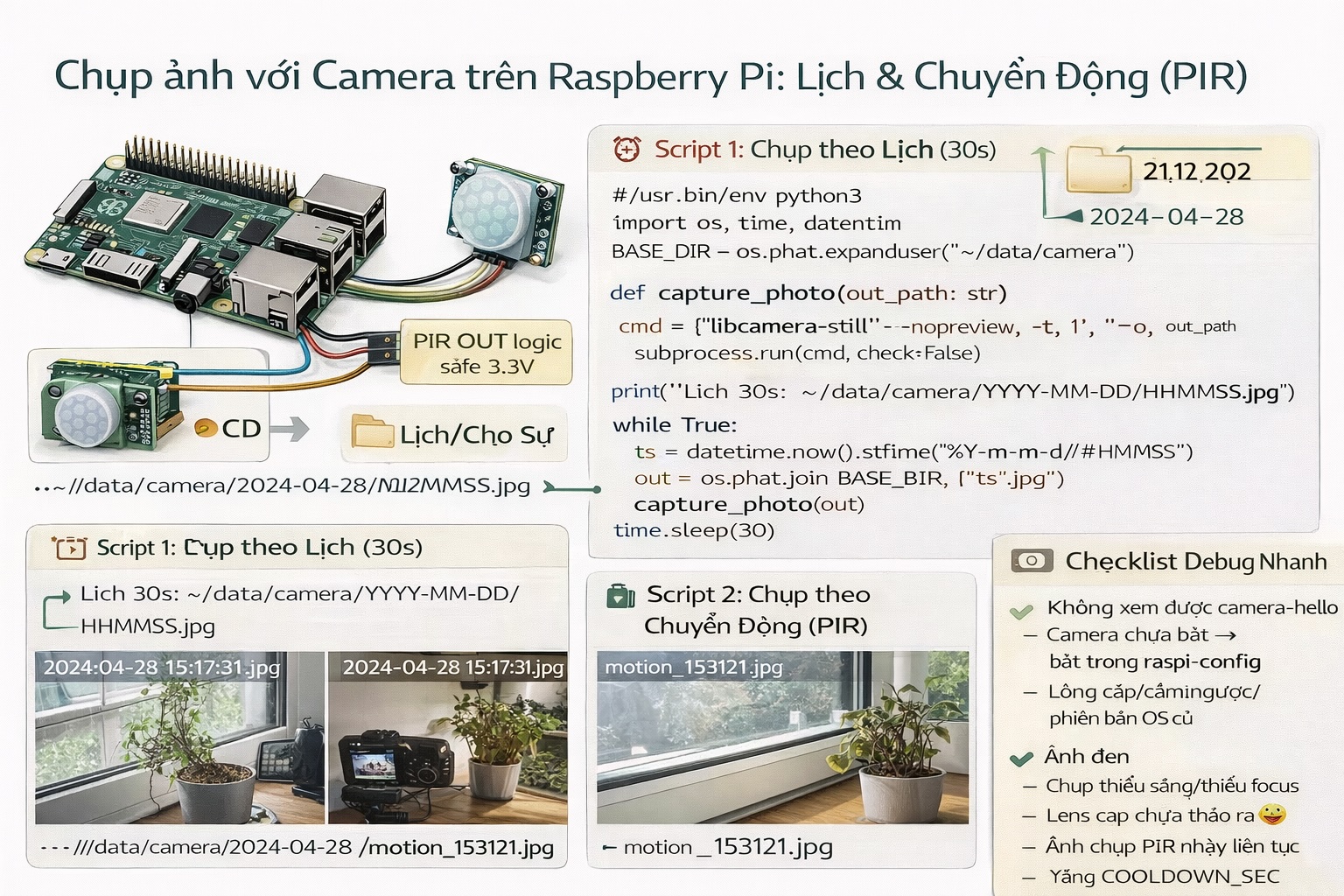
Series: Lập trình Raspberry Pi & Ứng dụng thực tế Phần 2 — Lập trình GPIO & phần cứng Bài 11: Camera cơ bản — chụp ảnh theo lịch / theo sự kiện (PIR) + lưu thư mục
1) Mục tiêu bài học
Sau bài này bạn sẽ:
- Cài camera trên Raspberry Pi và kiểm tra chụp ảnh OK.
- Chụp ảnh theo lịch (mỗi N giây/phút) để làm “time-lapse”.
- Chụp ảnh theo sự kiện: PIR phát hiện chuyển động → chụp ảnh.
- Lưu ảnh theo cấu trúc thư mục có timestamp để dễ xem lại.
Gợi ý: Bài này làm “camera cơ bản” (ảnh). Sang các phần sau mình mới mở rộng sang streaming, motion detect nâng cao, gửi event qua MQTT.
2) Chuẩn bị phần cứng
- Raspberry Pi + camera (ưu tiên Camera Module chính hãng hoặc camera compatible)
- (Tuỳ chọn) PIR sensor (HC-SR501) để trigger theo chuyển động
Wiring PIR (gợi ý)
- PIR VCC → 5V (hoặc 3.3V tuỳ module)
- PIR GND → GND
- PIR OUT → GPIO23 (Pin 16) (gợi ý)
Lưu ý: nhiều PIR output mức 3.3V là ok, nhưng có module output cao hơn. Nếu không chắc, dùng level shifting hoặc chọn module an toàn cho 3.3V logic.
3) Cài & kiểm tra camera
Trên Raspberry Pi OS đời mới, thường dùng libcamera.
Cập nhật:
sudo apt update
sudo apt -y full-upgrade
Kiểm tra camera:
libcamera-helloChụp ảnh test:
libcamera-still -o test.jpg
ls -lh test.jpg
Nếu thấy ảnh tạo ra là OK.
4) Tạo thư mục lưu ảnh theo ngày
mkdir -p ~/data/cameraMình sẽ lưu dạng:
- ~/data/camera/YYYY-MM-DD/HHMMSS.jpg
5) Script 1 — Chụp ảnh theo lịch (interval capture)
Tạo file:
mkdir -p ~/apps/pi-camera
cd ~/apps/pi-camera
nano capture_interval.py
Dán code:
import os
import time
import subprocess
from datetime import datetime

BASE_DIR = os.path.expanduser("~/data/camera")
INTERVAL_SEC = 30  # đổi tuỳ bạn

def ensure_dir(path: str):
    os.makedirs(path, exist_ok=True)

def capture_photo(out_path: str):
    # --nopreview để chạy headless
    # -t 1: chụp nhanh
    cmd = ["libcamera-still", "--nopreview", "-t", "1", "-o", out_path]
    subprocess.run(cmd, check=False)

def main():
    print(f"Interval capture started. Every {INTERVAL_SEC}s")
    while True:
        day = datetime.now().strftime("%Y-%m-%d")
        ts  = datetime.now().strftime("%H%M%S")
        folder = os.path.join(BASE_DIR, day)
        ensure_dir(folder)

        out = os.path.join(folder, f"{ts}.jpg")
        capture_photo(out)
        print("captured:", out)

        time.sleep(INTERVAL_SEC)

if __name__ == "__main__":
    main()
Chạy:
python3 capture_interval.py6) Script 2 — Chụp ảnh theo chuyển động (PIR trigger)
Cài gpiozero:
pip3 install gpiozeroTạo file:
nano capture_pir.pyDán code:
import os
import time
import subprocess
from datetime import datetime
from gpiozero import MotionSensor

BASE_DIR = os.path.expanduser("~/data/camera")
PIR_GPIO = 23
COOLDOWN_SEC = 10  # tránh chụp liên tục

pir = MotionSensor(PIR_GPIO)

def ensure_dir(path: str):
    os.makedirs(path, exist_ok=True)

def capture_photo(out_path: str):
    cmd = ["libcamera-still", "--nopreview", "-t", "1", "-o", out_path]
    subprocess.run(cmd, check=False)

def main():
    print("PIR capture started. Waiting motion...")
    last = 0

    while True:
        pir.wait_for_motion()
        now = time.time()
        if now - last < COOLDOWN_SEC:
            # bỏ qua nếu quá gần lần trước
            pir.wait_for_no_motion()
            continue

        day = datetime.now().strftime("%Y-%m-%d")
        ts  = datetime.now().strftime("%H%M%S")
        folder = os.path.join(BASE_DIR, day)
        ensure_dir(folder)

        out = os.path.join(folder, f"motion_{ts}.jpg")
        capture_photo(out)
        print("motion captured:", out)

        last = now
        pir.wait_for_no_motion()

if __name__ == "__main__":
    main()
Chạy:
python3 capture_pir.py7) Mẹo vận hành thực tế
- Cooldown để giảm spam ảnh (đặc biệt PIR nhạy).
- Lưu theo ngày để dọn dẹp dễ.
- Nếu chạy 24/7: ưu tiên SSD hoặc thẻ tốt + giới hạn log (Bài 2).
8) Debug nhanh
- libcamera-hello lỗi:
- camera cắm lỏng, cáp ngược, chưa bật camera interface (tuỳ OS/model)
- Ảnh đen:
- thiếu ánh sáng / lens cap / focus
- PIR nhảy liên tục:
- chỉnh biến trở sensitivity/time trên module PIR
- tăng COOLDOWN_SEC
9) Bài tập nâng cấp
- Thêm “overlay” timestamp lên ảnh (dùng ImageMagick hoặc PIL).
- Tạo service systemd để capture_pir.py tự chạy khi boot (áp dụng Bài 3).
- Tự xoá ảnh cũ > 7 ngày (cron job đơn giản).