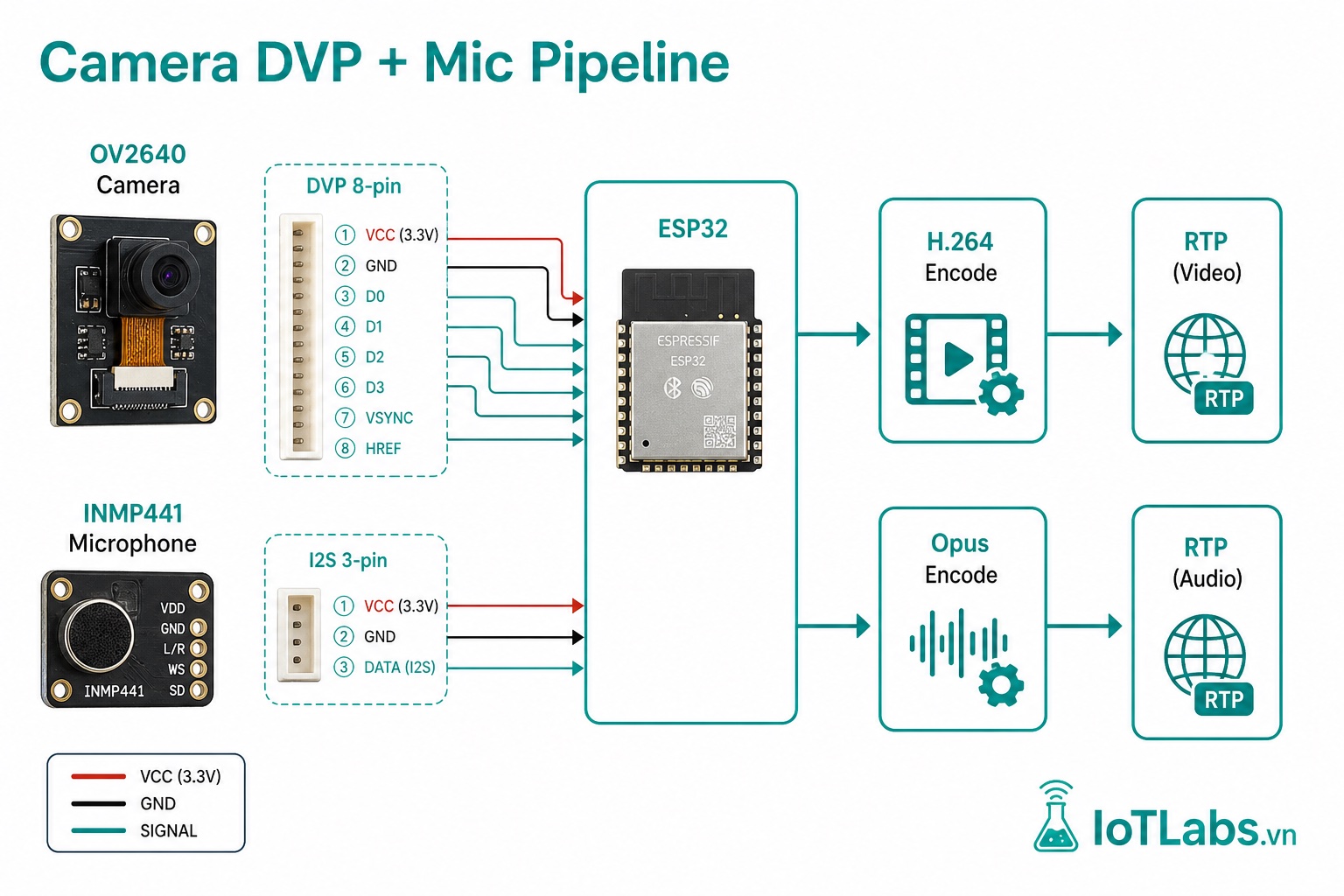
Có SDK rồi, hiểu codec rồi — giờ là phần thực tế nhất: cắm camera vào ESP32 đúng cách và cấu hình pipeline để audio/video chạy từ phần cứng lên đến WebRTC packet.
Camera DVP: Giao Thức Và Wiring
DVP (Digital Video Port) là giao thức parallel camera cổ điển, hỗ trợ trên ESP32-S3 và ESP32-P4. Gồm các tín hiệu:
| Pin | Tên | Mô Tả |
|---|---|---|
| PCLK | Pixel Clock | Clock đồng bộ data |
| VSYNC | Vertical Sync | Bắt đầu frame mới |
| HREF/HSYNC | Horizontal Sync | Bắt đầu line mới |
| D0–D7 | Data | 8-bit pixel data |
| XCLK | Clock Out | Clock cấp cho camera |
| SDA/SCL | I2C | Cấu hình register camera |
| PWDN | Power Down | Tắt camera |
| RESET | Reset | Reset camera |
Sơ Đồ Kết Nối OV2640 Với ESP32-P4
OV2640          ESP32-P4 (EV Board)
XCLK    →      GPIO_NUM_0
PCLK    →      GPIO_NUM_5
VSYNC   →      GPIO_NUM_6
HREF    →      GPIO_NUM_7
D0      →      GPIO_NUM_11
D1      →      GPIO_NUM_9
D2      →      GPIO_NUM_8
D3      →      GPIO_NUM_10
D4      →      GPIO_NUM_12
D5      →      GPIO_NUM_18
D6      →      GPIO_NUM_17
D7      →      GPIO_NUM_16
SDA     →      GPIO_NUM_4  (I2C_SDA)
SCL     →      GPIO_NUM_3  (I2C_SCL)
PWDN    →      GPIO_NUM_2
RESET   →      GPIO_NUM_1
3.3V    →      3.3V
GND     →      GND
Lưu ý: Trên ESP32-P4 EV Board, camera module thường đã được kết nối qua FFC connector — không cần wiring thủ công nếu dùng camera module chính hãng của EV Board.
[Hình minh hoạ: Sơ đồ kết nối DVP camera với ESP32-P4 — breadboard hoặc schematic]
Microphone I2S PDM
ESP-WebRTC dùng microphone qua I2S PDM (Pulse Density Modulation). Hầu hết mic module rẻ tiền (INMP441, MAX9814, MSM261) đều hỗ trợ I2S.
Kết Nối INMP441 Với ESP32-P4
INMP441         ESP32-P4
VDD     →      3.3V
GND     →      GND
SD      →      GPIO_NUM_45  (I2S_DATA_IN)
WS      →      GPIO_NUM_46  (I2S_WS)
SCK     →      GPIO_NUM_47  (I2S_BCK)
L/R     →      GND  (Chọn kênh LEFT)
Với ESP32-S3 Korvo-1, microphone đã tích hợp — không cần wiring.
Cấu Hình ESP-Capture
esp_capture là component quản lý toàn bộ pipeline thu audio/video. Cấu hình trong code:
#include "esp_capture.h"
#include "esp_capture_video_dvp.h"
#include "esp_capture_audio_i2s.h"

void init_capture(esp_capture_handle_t *cap_handle) {
    esp_capture_cfg_t cfg = {
        .task_priority = 5,
        .task_stack    = 4096,
    };
    esp_capture_init(&cfg, cap_handle);

    // Cấu hình video DVP
    esp_capture_video_dvp_cfg_t dvp = {
        .pin_pclk  = GPIO_NUM_5,
        .pin_vsync = GPIO_NUM_6,
        .pin_href  = GPIO_NUM_7,
        .pin_d0    = GPIO_NUM_11,
        // ... (các pin còn lại)
        .pin_xclk  = GPIO_NUM_0,
        .xclk_freq = 20000000,  // 20MHz XCLK cho OV2640
        .width     = 1280,
        .height    = 720,
        .fps       = 25,
        .fmt       = VIDEO_FMT_YUV422,
    };
    esp_capture_add_video_source(*cap_handle, ESP_CAPTURE_VIDEO_DVP, &dvp);

    // Cấu hình audio I2S
    esp_capture_audio_i2s_cfg_t i2s = {
        .port         = I2S_NUM_0,
        .pin_bck      = GPIO_NUM_47,
        .pin_ws       = GPIO_NUM_46,
        .pin_data_in  = GPIO_NUM_45,
        .sample_rate  = 16000,  // 16kHz cho Opus
        .bits_per_sample = 16,
        .channel      = 1,      // Mono
    };
    esp_capture_add_audio_source(*cap_handle, ESP_CAPTURE_AUDIO_I2S, &i2s);
}
Pipeline Flow
Khi capture chạy, data flow như sau:
[Camera DVP] → [PPA: scale+convert] → [H.264 HW Encoder] → [RTP Packetizer] → [WebRTC]
[Mic I2S] → [Resample] → [Opus Encoder] → [RTP Packetizer] → [WebRTC]espcapture và espwebrtc được kết nối qua callback:
// Kết nối capture output vào WebRTC input
esp_webrtc_set_video_source(webrtc_handle, cap_handle);
esp_webrtc_set_audio_source(webrtc_handle, cap_handle);
AV-Render: Nhận Audio/Video Từ Peer
av_render là component ngược lại — nhận RTP stream từ browser và output ra speaker + màn hình.
#include "av_render.h"

av_render_cfg_t render_cfg = {
    // Audio output qua I2S DAC hoặc internal DAC
    .audio = {
        .type         = AV_RENDER_AUDIO_I2S,
        .port         = I2S_NUM_1,
        .pin_bck      = GPIO_NUM_40,
        .pin_ws       = GPIO_NUM_41,
        .pin_data_out = GPIO_NUM_42,
        .sample_rate  = 16000,
    },
    // Video output qua LCD (nếu có)
    .video = {
        .type = AV_RENDER_VIDEO_LCD,
        .lcd_handle = lcd_handle,
    },
};

av_render_handle_t render;
av_render_init(&render_cfg, &render);
esp_webrtc_set_av_render(webrtc_handle, render);
Speaker Kết Nối
Với ESP32-P4 EV Board, speaker kết nối qua audio amplifier NS4168 tích hợp:
ESP32-P4 I2S_DOUT → NS4168 → Speaker 4Ω/2WOutput config cho NS4168:
// I2S transmit cho speaker
.audio_out_port = I2S_NUM_1,
.audio_out_sample_rate = 16000,
.audio_out_bits = 16,
Debug Pipeline
Nếu video không hiển thị hoặc audio không nghe được, kiểm tra log:
# Bật verbose logging
idf.py menuconfig
# → Component config → ESP Capture → Log level → DEBUG
Log thành công trông như:
D (1234) esp_capture: Video DVP init OK, 1280x720@25fps
D (1235) esp_capture: Audio I2S init OK, 16000Hz mono
D (2345) esp_webrtc: RTP video sender started
D (2346) esp_webrtc: RTP audio sender started
Bài tiếp theo: Signaling Server WHIP — Tự Deploy Trong 30 Phút