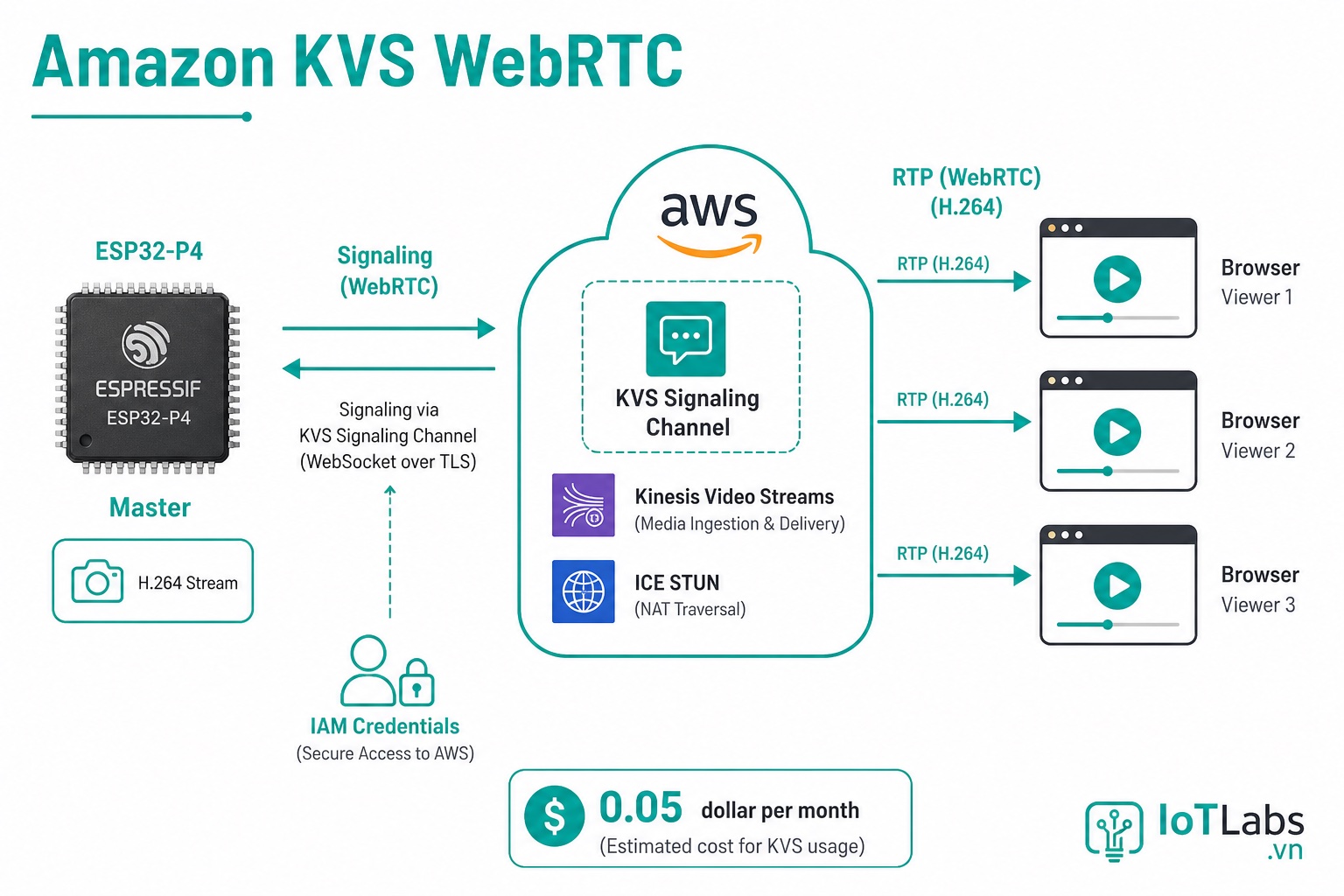
Các bài trước dùng signaling server tự deploy. Amazon Kinesis Video Streams (KVS) là giải pháp managed — AWS xử lý toàn bộ signaling, STUN/TURN, lưu trữ video và scaling. Phù hợp khi cần production-grade camera system.
KVS Là Gì?
Amazon Kinesis Video Streams là dịch vụ video streaming managed của AWS với hai mode:
| Mode | Mô Tả | Dùng Khi |
|---|---|---|
| KVS Producer SDK | Ingest video → lưu S3, phân tích AI | Camera giám sát, phân tích hành vi |
| KVS WebRTC | P2P real-time qua AWS signaling | Video call, live monitoring |
Series này dùng KVS WebRTC — không lưu trữ, chỉ live stream với latency thấp.
Chi Phí
KVS WebRTC tính tiền:
- $0.05 per signaling channel per month
- $0.05 per 1000 TURN minutes
Ước tính: camera stream 8 giờ/ngày, 30 ngày = ~14.000 TURN minutes/tháng = $0.70/tháng. Rất rẻ cho production.
Thiết Lập AWS
Tạo KVS Signaling Channel
# Cài AWS CLI
pip install awscli
aws configure  # Nhập Access Key, Secret Key, Region (ap-southeast-1 cho VN)

# Tạo signaling channel
aws kinesisvideo create-signaling-channel \
    --channel-name "esp32-camera" \
    --channel-type SINGLE_MASTER \
    --region ap-southeast-1
Kết quả trả về ChannelARN — lưu lại để dùng trong config ESP32.
Tạo IAM User Cho ESP32
ESP32 cần credentials để kết nối KVS. Tạo IAM user với quyền tối thiểu:
{
  "Version": "2012-10-17",
  "Statement": [
    {
      "Effect": "Allow",
      "Action": [
        "kinesisvideo:ConnectAsMaster",
        "kinesisvideo:GetSignalingChannelEndpoint",
        "kinesisvideo:GetIceServerConfig"
      ],
      "Resource": "arn:aws:kinesisvideo:ap-southeast-1:*:channel/esp32-camera/*"
    }
  ]
}
Tạo Access Key cho IAM user này — dùng trong ESP32.
Cấu Hình ESP32
#include "esp_webrtc.h"
#include "esp_webrtc_kvs.h"

// AWS credentials — lưu trong NVS hoặc menuconfig, KHÔNG hardcode
#define AWS_REGION          "ap-southeast-1"
#define AWS_ACCESS_KEY_ID   CONFIG_AWS_ACCESS_KEY_ID
#define AWS_SECRET_KEY      CONFIG_AWS_SECRET_KEY
#define KVS_CHANNEL_NAME    "esp32-camera"

void app_main(void) {
    wifi_init_sta(CONFIG_WIFI_SSID, CONFIG_WIFI_PASS);
    wifi_wait_connected();

    // Camera + capture pipeline
    esp_capture_handle_t cap;
    init_capture(&cap);

    // WebRTC với KVS signaling
    esp_webrtc_cfg_t cfg = {
        .signaling = {
            .type                = ESP_WEBRTC_SIGNALING_KVS,
            .kvs_channel_name    = KVS_CHANNEL_NAME,
            .kvs_region          = AWS_REGION,
            .kvs_access_key      = AWS_ACCESS_KEY_ID,
            .kvs_secret_key      = AWS_SECRET_KEY,
            .kvs_role            = ESP_WEBRTC_KVS_ROLE_MASTER,  // ESP32 là MASTER
        },
        .video_codec = ESP_WEBRTC_VIDEO_CODEC_H264,
        .audio_codec = ESP_WEBRTC_AUDIO_CODEC_OPUS,
    };

    esp_webrtc_handle_t webrtc;
    esp_webrtc_init(&cfg, &webrtc);
    esp_webrtc_set_av_source(webrtc, cap);
    esp_webrtc_start(webrtc);

    ESP_LOGI("kvs", "KVS WebRTC Master started, channel: %s", KVS_CHANNEL_NAME);
}
[Hình minh hoạ: Architecture diagram: ESP32 → KVS WebRTC → AWS → Browser Viewer]
Lưu Trữ Credentials An Toàn
Không hard-code AWS credentials trong firmware. Dùng ESP-IDF NVS (Non-Volatile Storage):
#include "nvs_flash.h"
#include "nvs.h"

void store_credentials(const char *access_key, const char *secret_key) {
    nvs_handle_t handle;
    nvs_open("aws_creds", NVS_READWRITE, &handle);
    nvs_set_str(handle, "access_key", access_key);
    nvs_set_str(handle, "secret_key", secret_key);
    nvs_commit(handle);
    nvs_close(handle);
}

void load_credentials(char *access_key, size_t ak_len,
                      char *secret_key, size_t sk_len) {
    nvs_handle_t handle;
    nvs_open("aws_creds", NVS_READONLY, &handle);
    nvs_get_str(handle, "access_key", access_key, &ak_len);
    nvs_get_str(handle, "secret_key", secret_key, &sk_len);
    nvs_close(handle);
}
Provision credentials một lần qua BLE hoặc trang web setup — không qua firmware flash.
Viewer: Xem Stream Từ Browser
KVS WebRTC cần viewer kết nối từ phía browser. AWS cung cấp JavaScript SDK:
<!DOCTYPE html>
<html>
<head>
  <script src="https://cdn.jsdelivr.net/npm/amazon-kinesis-video-streams-webrtc/dist/kvs-webrtc.min.js"></script>
</head>
<body>
<video id="remoteVideo" autoplay playsinline style="width:100%"></video>

<script>
const AWS_REGION = 'ap-southeast-1';
const CHANNEL_NAME = 'esp32-camera';
// Credentials cho viewer (dùng cognito hoặc temporary creds)
const ACCESS_KEY = 'AKIA...';
const SECRET_KEY = '...';

async function startViewer() {
  const kinesisVideoClient = new AWS.KinesisVideo({
    region: AWS_REGION,
    credentials: { accessKeyId: ACCESS_KEY, secretAccessKey: SECRET_KEY }
  });

  // Lấy endpoint
  const { ResourceEndpointList } = await kinesisVideoClient.getSignalingChannelEndpoint({
    ChannelARN: CHANNEL_ARN,
    SingleMasterChannelEndpointConfiguration: {
      Protocols: ['WSS', 'HTTPS'],
      Role: 'VIEWER'
    }
  }).promise();

  // Khởi tạo SignalingClient
  const signalingClient = new KVSWebRTC.SignalingClient({
    role: KVSWebRTC.Role.VIEWER,
    // ... (endpoint từ trên)
  });

  const pc = new RTCPeerConnection({ iceServers: [] });
  pc.ontrack = e => document.getElementById('remoteVideo').srcObject = e.streams[0];

  signalingClient.on('sdpAnswer', async answer => {
    await pc.setRemoteDescription(answer);
  });
  signalingClient.on('iceCandidate', candidate => {
    pc.addIceCandidate(candidate);
  });

  signalingClient.open();
  const offer = await pc.createOffer({ offerToReceiveVideo: true, offerToReceiveAudio: true });
  await pc.setLocalDescription(offer);
  signalingClient.sendSdpOffer(offer);
}

startViewer();
</script>
</body>
</html>
KVS vs MediaMTX: Khi Nào Dùng Cái Nào?
| Tiêu Chí | KVS (AWS) | MediaMTX (Self-hosted) |
|---|---|---|
| Chi phí | ~$1-5/tháng | Chi phí VPS (~$5/tháng) |
| Setup | AWS console + IAM | Docker 1 lệnh |
| Scaling | Tự động (AWS) | Tự quản lý |
| Reliability | 99.9% SLA | Tùy bạn |
| Latency | ~300-500ms | ~100-200ms |
| Lưu trữ video | Có (thêm Producer SDK) | Không |
| Privacy | Video qua AWS | Tự control |
Kết luận: MediaMTX cho prototype và dự án cá nhân. KVS cho sản phẩm cần reliability cao, nhiều camera, hoặc cần lưu trữ video.
Lưu Ý Security
- Viewer credentials: Không dùng AWS root credentials cho viewer. Tạo Cognito Identity Pool để issue temporary credentials — người dùng không thấy AWS keys.
- Channel access control: KVS Signaling Channel mặc định private — chỉ IAM user/role được phép mới kết nối được.
- Rotation credentials: Đặt rotation policy cho IAM access key — 90 ngày đổi một lần.
Series ESP-WebRTC đến đây kết thúc 13 bài kỹ thuật. Xem Tổng Quan Series ESP-WebRTC để xem toàn bộ lộ trình và liên kết tất cả bài.